
Run these crawlability and indexability checks first because they decide whether anything else on this list matters. If Google can't fetch and index a page, faster load times and perfect schema won't help it rank. Start with a robots.txt fetch, a Search Console coverage scan, a quick crawl with any standard crawler, and a PageSpeed Insights run on your highest-traffic page. Treat the rest of this technical SEO checklist as a prioritized backlog, not a box-checking exercise.
TL;DR:
- Ensuring crawlability with proper robots.txt, sitemaps, and indexing directives is crucial since invisible crawling issues prevent any SEO improvements from taking effect.
- Fixing site architecture issues, like orphan pages and improper internal linking, significantly impacts crawl frequency and page ranking potential.
- Prioritizing Core Web Vitals improvements based on real user data helps optimize user experience and align technical efforts with actual ranking factors.
- Mobile-first indexing requires full mobile version equivalency, so missing or broken mobile content can quietly harm search visibility.
- Regular monitoring through automated tools and site audits prevents regressions and keeps technical SEO health on track, especially before major updates or deployments.
Table of Contents
- Technical SEO Checklist: Crawlability and Indexing Checks
- Site Architecture and Internal Linking Checklist
- Performance and Core Web Vitals: What to Measure First
- Does Google See Your Mobile Site the Same Way Users Do?
- Security, HTTPS, and Site Hygiene Checklist
- Structured Data and Search Appearance Checklist
- Canonicalization, Redirects, and Sitemap Checklist
- Monitoring, Tooling, and Audit Workflow
- How Honey Badger SEO Applies This Checklist
- How to Handle Duplicate Content Without Losing Rankings
- Correct Hreflang Implementation for Multilingual Sites
- Pagination Best Practices for Crawl Efficiency
- An Editor's Take on Stopping Regressions Before They Start
- Get a Managed Technical SEO Audit From Honey Badger SEO
- Sources
Technical SEO Checklist: Crawlability and Indexing Checks
Everything downstream of crawlability is wasted effort if Googlebot can't reach the page in the first place. This is the foundation of any technical SEO audit checklist, and it's also where the most damaging mistakes hide, because they're often invisible until traffic drops.
Google's own developer documentation is blunt about the sequencing here: keep important resources crawlable, use sitemaps to help prioritize which pages matter, and reach for meta noindex instead of robots.txt when you actually want a page kept out of the index, since robots.txt blocks fetching but doesn't stop indexing on its own. That distinction trips up a lot of site owners who assume a robots.txt disallow is the same as a noindex tag. It isn't.
- Fetch robots.txt on every production host, not just the main domain. Staging environments, subdomains, and CDN-fronted hosts can each serve a different robots.txt. A staging file accidentally pushed to production during a deploy can quietly block your entire site, and this happens more often than most teams admit.
- Validate your XML sitemap returns a 200 status, parses cleanly, and lists only canonical, indexable URLs. A sitemap full of redirects, 404s, or noindexed pages tells Google your sitemap can't be trusted, and that skepticism bleeds into how thoroughly it crawls the rest of your site.
- Use Search Console's Coverage report and URL Inspection tool to find "crawled, not indexed" and "discovered, not indexed" buckets. These two groups are where most indexing problems hide, and they rarely show up any other way.
- Hunt for orphan pages and crawl traps. Infinite date-based calendars, faceted navigation that generates near-limitless URL combinations, and internal search results pages all burn crawl budget without adding value. Prioritize fixes by which pages actually drive business impact, not by which are easiest to fix.
- Confirm your X-Robots-Tag headers and meta robots tags are intentional. Check that critical CSS and JavaScript files aren't blocked in a way that prevents Google from rendering the page correctly, since a blocked stylesheet can make Googlebot see a broken, unstyled version of your site.
Pro Tip: Check robots.txt immediately after every infrastructure or CMS deploy, not on some quarterly schedule. A staging robots.txt file mistakenly pushed live can cause a visibility outage within hours, and most teams don't notice until rankings tank a week later.
Site Architecture and Internal Linking Checklist
Site structure determines how often Googlebot revisits your priority pages and how much authority flows to them. A technically sound page buried five clicks from the homepage gets crawled less often and ranks worse than an equivalent page one click away.
- Map your priority templates (service pages, high-margin product pages, top blog content) and confirm they sit within three clicks of the homepage.
- Run a full-site crawl and cross-reference it against your XML sitemap and analytics data to detect orphan pages, then add contextual internal links from topically related hub pages.
- Implement breadcrumb schema and write descriptive anchor text ("commercial insulation estimate" beats "click here") so both crawlers and users understand what a linked page is about.
- Control faceted navigation with canonical tags or parameter handling rules, or block low-value filter combinations outright, since uncontrolled facets can generate thousands of near-duplicate URLs that dilute crawl budget.
- Build hub pages that group related content and link out to supporting pages, then update your site templates so new content automatically inherits those internal links.
Pro Tip: If a page hasn't earned a single internal link from a high-authority page on your site in the last year, ask whether it deserves to exist at all. Orphan pages aren't just a crawl problem, they're usually a content problem too.
The fix here isn't always technical. Sometimes it's editorial: a content team publishes a new location page and forgets to link it from the service page it supports. Building link-checking into your publishing workflow catches this before it becomes an audit finding six months later.
Performance and Core Web Vitals: What to Measure First
Core Web Vitals are field metrics, measured from actual visitor sessions, not lab simulations, and the current thresholds are LCP under 2.5 seconds, INP under 200 milliseconds, and CLS under 0.1. Lab tools estimate these numbers, but Google ranks based on real-user data collected through the Chrome User Experience Report, so a page that looks fast in a lab test can still fail in the field if it performs poorly on a mid-range Android phone with a weak connection.
- Pull field data from Search Console's Core Web Vitals report and cross-check it against lab results from PageSpeed Insights and WebPageTest. WebPageTest's waterfall view is particularly good at isolating which third-party script is responsible for a slow render.
- Fix LCP by optimizing your hero image. Serve WebP or AVIF formats, set explicit width and height attributes, add
fetchpriority="high"to the largest above-the-fold image, and shrink server response time (TTFB), since a slow server response delays everything that follows it. - Mitigate INP by identifying long tasks, usually caused by third-party scripts. Analytics tags, session recording tools, and chat widgets are the most common root cause of INP failures, since INP replaced FID as a Core Web Vital and is noticeably harder to pass. Defer these scripts or load them only after a user interacts with the page.
- Fix CLS by reserving space for images, embeds, and iframes before they load, and avoid injecting banners, cookie notices, or ads above the fold after the initial render.
- Triage every fix by impact times effort, then retest with both lab tools and real-user data after deployment. A change that looks great in PageSpeed Insights but doesn't move your field CrUX numbers within a few weeks needs a second look.
Statistic Callout: The current Core Web Vitals thresholds, an LCP under 2.5 seconds, an INP under 200 milliseconds, and a CLS score under 0.1, are the benchmarks Google measures from real visitor data, not from a single lab test run.
Prioritizing by measurable effect on these field metrics, rather than chasing a perfect lab score, keeps engineering time focused on changes users actually feel.
Does Google See Your Mobile Site the Same Way Users Do?
Mobile-first indexing means Google predominantly uses the mobile version of your site to rank pages, so any content, links, or structured data missing from the mobile render simply doesn't count. This is one of the most common gaps in a technical SEO audit checklist, because a site can look complete on desktop and be quietly broken on mobile.
- Compare the rendered DOM in Search Console's URL Inspection tool against both the live page source and what a real visitor actually sees on a phone.
- If your site relies on client-side rendering, confirm you're using server-side rendering or reliable prerendering, since crawlers that can't execute JavaScript correctly will simply miss content that only appears after a client-side render.
- Test on actual devices across multiple viewport sizes, not just a browser's responsive mode, and check that tap targets and font sizes meet basic usability thresholds.
- Confirm that images, CSS, and JavaScript files critical to the page aren't blocked to mobile crawlers by a misconfigured robots.txt or CDN rule.
- Add a mobile regression check to every deployment. A CSS change that looks fine on a laptop screen can break tap target spacing on a phone without anyone noticing until rankings shift.
Sites built with rendering in mind from the start avoid most of this friction entirely; it's one reason websites built to rank and convert treat mobile rendering as a launch requirement rather than a post-launch fix.
Security, HTTPS, and Site Hygiene Checklist
Security issues erode trust with both users and search engines, and an unmonitored site is an easy target. Malware incidents are tracked at scale across the web every year, which is reason enough to treat scanning and monitoring as a recurring task, not a one-time setup.
- Verify HTTPS loads sitewide with a valid certificate, and confirm every HTTP request redirects to the canonical HTTPS version, not just the homepage.
- Scan for mixed content (HTTP resources loading on HTTPS pages) and roll out HSTS progressively rather than flipping it on sitewide overnight.
- Add security headers where they apply: Content-Security-Policy, X-Frame-Options, and X-Content-Type-Options all reduce attack surface without affecting SEO negatively.
- Run regular malware scans and set up alerts for unexpected file changes, then keep your CMS core and plugins updated, since outdated plugins are a common entry point for compromise.
- Make sure retired content returns the correct status code (410 for permanently gone, 301 for moved) and remove old crawlable URLs that no longer serve a purpose.
Structured Data and Search Appearance Checklist
Schema markup doesn't guarantee a rich result, but it gives Google the context it needs to consider showing one, and getting it wrong can do more harm than skipping it entirely.
- Match schema types to templates. Use Article schema for blog content, BreadcrumbList for navigation context, Product for e-commerce listings, Organization for your business entity, and FAQPage only where the visible content genuinely contains questions and answers.
- Implement JSON-LD with the required properties for each type, and make sure the markup mirrors what's actually visible on the page. Marking up a price or rating that a visitor can't see anywhere on the page is exactly the kind of mismatch that gets rich results suppressed.
- Validate every implementation with the Rich Results Test and a schema validator, then monitor the Enhancements section in Search Console for errors that surface after a template change.
- Never fabricate markup to manufacture a rich result. Google's guidelines are explicit that structured data must reflect real, visible page content, and getting caught can cost you the rich result across your entire site, not just the offending page.
- Track impressions and click-through rate for queries where a rich result is showing, and compare that against similar queries without one to see whether the markup is actually earning extra clicks.
Canonicalization, Redirects, and Sitemap Checklist
Canonical tags and redirects are where a lot of otherwise solid technical SEO work quietly falls apart, usually through accumulation rather than a single mistake.
- Confirm self-referential canonical tags use absolute, production URLs, not relative paths or staging domains, and check that no page carries more than one canonical tag.
- Shorten redirect chains to two hops maximum, and eliminate any redirect loops you find. Chains longer than that waste crawl budget and dilute link equity with each hop.
- Check that apex (non-www) and www versions of your domain both redirect to a single canonical version, since inconsistent handling here creates duplicate indexing paths.
- Confirm your XML sitemap returns a 200 status, parses without errors, and lists only canonical, indexable URLs, not redirected or blocked ones.
- Use a 410 status for pages you've intentionally and permanently removed, and 301 for anything that moved to a new URL. Audit parameterized URLs (sort orders, tracking tags, session IDs) and decide, page by page, whether they need canonicalization, blocking, or reporting through Search Console's parameter handling.
Pro Tip: Redirect chains tend to grow over years, not overnight; a page redirected in 2022 and redirected again in 2024 can end up three or four hops deep by 2026. Audit your redirect map annually, not just when something breaks.
Monitoring, Tooling, and Audit Workflow
A technical SEO checklist is only useful if it's run on a schedule, with evidence recorded and findings prioritized, rather than treated as a one-time cleanup.
- Run Google Search Console, PageSpeed Insights, WebPageTest, and a full-site crawler like Screaming Frog or Sitebulb on a recurring basis, and pull raw server logs periodically for a view neither tool can give you.
- Sample your audit across the homepage, every major template, high-impression pages from Search Console, and anything changed recently. Recent changes are disproportionately likely to have introduced a regression.
- Record every finding with its severity, an owner, and a retest date. Findings without an owner rarely get fixed, and findings without a retest date rarely get verified.
- Prioritize the backlog by impact times effort times confidence, so the team spends its limited hours on fixes that move real metrics, not just on what's easiest to knock out.
- Schedule regression diffing after every deploy and set alerts for sudden drops in indexed page count or coverage, since these often catch problems days before they show up in traffic.
- Pull server logs to see how bots actually crawl your site, which reveals wasted crawl budget that a standard crawler simulation will never show you, because it only sees what a bot could crawl, not what real bots chose to prioritize.
| Audit Area | Primary Tool | Check Frequency |
|---|---|---|
| Crawlability and indexing | Search Console, robots.txt fetch | After every deploy |
| Core Web Vitals | PageSpeed Insights, WebPageTest | Monthly |
| Site architecture | Screaming Frog or Sitebulb | Quarterly |
| Server behavior | Log file analysis | Quarterly |
| Structured data | Rich Results Test | After template changes |
Exportable audit templates from crawlers like Sitebulb make it easier to train a team on a consistent process and keep remediation tracking from living in someone's head.
How Honey Badger SEO Applies This Checklist
This checklist isn't theoretical for Honey Badger SEO. It's the same sequence applied to real local businesses that need phone calls and booked appointments, not just better rankings on paper.
- On insulation contractor sites, a common finding is a broken sitemap combined with conflicting canonical tags on service-area pages, both of which suppress indexing of the exact pages meant to generate estimate calls. Fixing the sitemap, cleaning up canonicals, and adding internal links from the main service page back to each location page typically brings those pages back into the index within weeks.
- For dental practices, mobile rendering issues around embedded booking widgets have repeatedly hidden calls-to-action from Googlebot's mobile render, even though the desktop version looked fine.
- Local businesses around Scottsdale have seen measurable indexation recovery after fixing exactly the crawl trap and orphan page issues covered earlier in this technical seo checklist.
Every fix runs in-house, month to month, with no outsourced labor and no long-term lock-in contract. Clients keep ownership of every asset the work touches, from the site itself to the Google Business Profile. Readers who want this handled directly can review the Scottsdale SEO service page for how a full audit and remediation plan is structured.
How to Handle Duplicate Content Without Losing Rankings
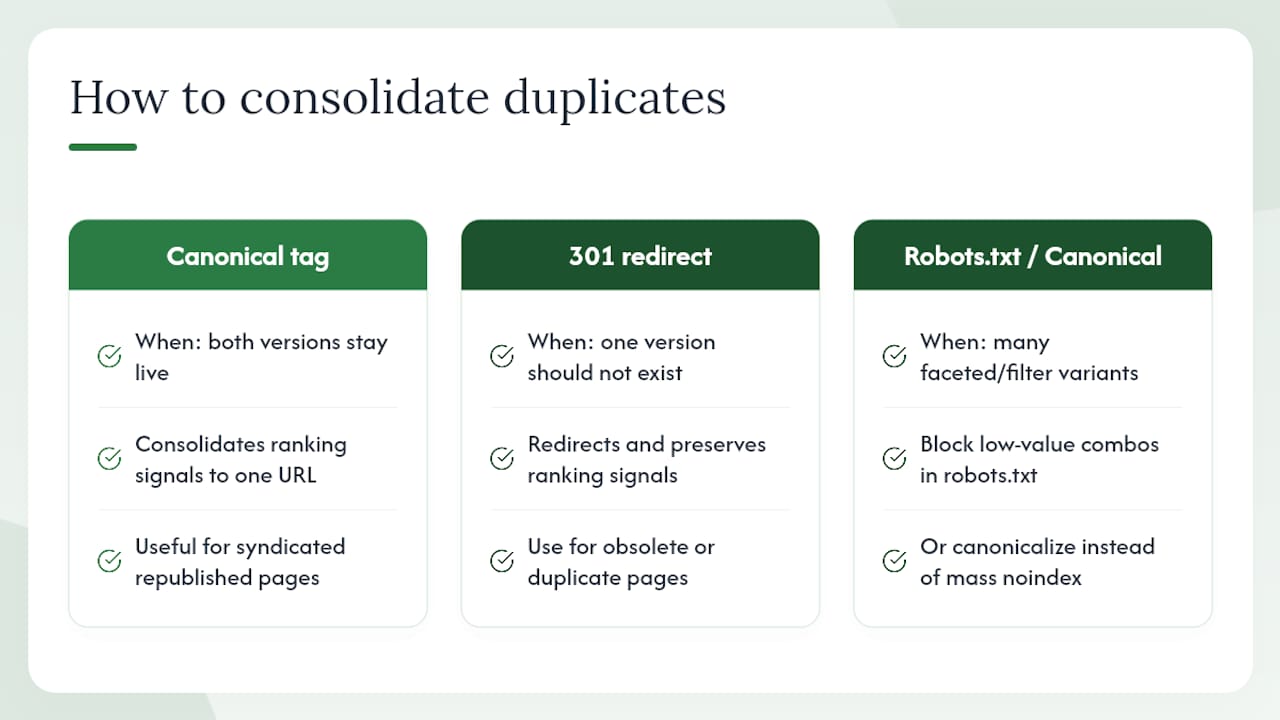
Duplicate content splits ranking signals across multiple URLs instead of consolidating them onto one, and it's rarely intentional. It usually comes from parameterized URLs, printer-friendly page versions, HTTP/HTTPS or www/non-www inconsistencies, or syndicated content republished without a canonical pointing back to the original.
Start by finding your duplicates: a site crawl combined with a manual site: search for distinctive phrases usually surfaces the worst offenders. Once found, pick one consolidation method per case. Canonical tags work well when both versions need to stay live for users. A 301 redirect works better when one version genuinely should not exist anymore. For syndicated content, ask the republishing site to include a canonical tag pointing to your original, since that keeps the ranking signal where it belongs.
Faceted navigation and search-result pages are the most common ongoing source of duplication, since a single product can generate dozens of near-identical URLs through sort and filter combinations. Block low-value combinations in robots.txt or handle them through canonical tags, rather than trying to noindex every single variant one by one.
Correct Hreflang Implementation for Multilingual Sites
Hreflang tells search engines which language and regional version of a page to show a given searcher, and it's one of the most error-prone tags in technical SEO because small mistakes fail silently.
Every hreflang implementation needs to be reciprocal: if your English page references a Spanish version, that Spanish page must reference the English version right back. A one-directional link is treated as invalid and ignored entirely. Use the correct ISO language code, and add a region code only when you're genuinely targeting a specific country, not just a language (es for general Spanish, es-mx specifically for Mexico). Always include a self-referencing hreflang tag on every page in the set, including the page itself.

Include an x-default tag to catch visitors who don't match any of your specified language or region combinations. Validate the whole implementation with Search Console's International Targeting report, since hreflang errors there are common even on otherwise well-optimized sites, and they don't throw an obvious error, they just quietly serve the wrong version to the wrong audience.
Pagination Best Practices for Crawl Efficiency
Paginated series, whether a blog archive, a product category, or a long comment thread, split content across multiple URLs, and how you handle that split affects both crawl efficiency and which page ranks.
Google no longer relies on rel="next" and rel="prev" tags, so don't spend time implementing them expecting an SEO benefit. Instead, give each page in the series a unique, descriptive title and a self-referencing canonical tag rather than canonicalizing every page back to page one, since that tells Google the deeper pages don't matter, and it will often stop crawling them.
For product category pagination, consider a "view all" page if load time allows it, since Google sometimes prefers to rank a single comprehensive page over a paginated series. For content archives, make sure internal links point to the actual paginated URLs rather than relying entirely on JavaScript-driven infinite scroll, since infinite scroll without paginated URL fallbacks can hide the bulk of your content from crawlers entirely.
An Editor's Take on Stopping Regressions Before They Start
Most technical SEO problems aren't new; they're the same fix undone by the next deploy. A canonical tag gets reverted during a template migration. A robots.txt change made for a staging test slips into production. The checklist above catches these, but catching them after they've already cost you two weeks of indexing is expensive. Running a full audit quarterly, with automated pre-deploy checks for robots.txt and meta robots changes, catches most of this before it ships.
The bigger unlock isn't technical at all. It's how these fixes get pitched to engineering. Framing a redirect chain cleanup as "reduces server load" or a JavaScript defer as "improves page stability" tends to land better with developers than framing everything as an SEO request, because it connects the fix to something they already care about. A short staging-to-production checklist and a recurring log analysis slot on the calendar do more for long-term technical health than any single heroic audit ever will.
— Anas
Get a Managed Technical SEO Audit From Honey Badger SEO
Running through this checklist manually every quarter is realistic for a team with dedicated SEO hours. Most local business owners don't have that time, and that's exactly the gap Honey Badger SEO fills: a done-for-you technical audit and remediation service, not a report that sits in a shared drive unread.
The engagement covers a prioritized technical audit, a remediation plan with named owners and retest dates for every finding, and monthly reporting so you can see exactly what changed and why. Everything, from website builds to ongoing local SEO management, runs in-house on a month-to-month basis with no long-term contract, and you keep ownership of every asset touched along the way. If you're ready to see where your site is losing crawl budget or indexation, request a prioritized audit through the Scottsdale SEO page and get a concrete remediation plan instead of another generic report.
Sources
- Technical SEO Techniques and Strategies | Google Search Central | Documentation | Google for Developers
- Technical SEO — Semrush blog
- WebPageTest
- Technical SEO Audit Checklist & Template - Free to Use | Sitebulb