
Service area pages are location-specific landing pages that let a business without a storefront rank for "service + city" searches, like "emergency plumber Mesa" or "HVAC repair Chandler." The single most important move is to build a small set of these, typically 2 to 5 priority cities, each with genuinely unique content, rather than mass-producing near-identical pages for every ZIP code in your territory. The rest of this guide covers the exact structure, technical setup, and measurement steps to make that work.
TL;DR:
- Focus on building 2 to 5 high-quality service area pages for top cities based on demand, avoiding mass creation of similar pages.
- Ensure each page contains unique local proof, specific content, and city-specific FAQs to prevent being flagged as doorway pages.
- Use a simple URL structure, descriptive metadata, schema markup, and make each page easily crawlable to improve search visibility.
- Prioritize creating pages that respond to actual local service queries rather than generic or duplicate content.
- Measure success through city-specific performance data, call tracking, and controlled experiments before expanding to new locations.
Table of Contents
- What Are Service Area Pages and Who Needs Them?
- Service Area Pages vs. Location Pages: Choosing the Right Type
- Must-Have Elements and Page Structure for a High-Quality SAP
- Page-Level SEO: URLs, Metadata, Schema, and Crawlability
- Avoiding the Doorway Page Trap
- How Many Areas Should You Target?
- Measuring Whether Your SAPs Are Working
- The Hands-On Implementation Checklist
- Why a Focused Strategy Beats Mass-Publishing
- Get Hands-On Help Building Pages That Convert
- Sources
What Are Service Area Pages and Who Needs Them?
A service area page (SAP) is built for businesses that travel to the customer instead of the other way around. Think mobile plumbers, traveling notaries, HVAC technicians, pest control crews, and mobile detailers. None of these businesses want customers walking into an office, so a traditional "visit us at" location page doesn't fit. Instead, the SAP answers a specific question: "Do you work in my city?"
These pages exist because search intent demands it. Someone typing "water heater repair Gilbert" isn't researching water heaters generally. They want a company that shows up in Gilbert, today, ideally within the hour. Service area pages act as mini local landing pages that speak directly to that intent by naming the city, describing the specific service, and giving a fast way to get in touch.
Not every business needs SAPs, though. If customers physically walk into your shop, a repair counter, a salon, a dental office, you're better off with a location page tied to a Google Business Profile at that address. The dividing line comes down to one question:
- Does the customer come to you, or do you go to the customer?
- If you go to them, and you serve a defined but storefront-free territory, an SAP is the right tool.
- If you have walk-in traffic at a fixed address, a location page (or several, for multi-location brands) does the job better.
Plenty of businesses need both. A regional HVAC company might have two physical branches (location pages) while also running service crews into eight surrounding towns where it has no office (SAPs for each).
Service Area Pages vs. Location Pages: Choosing the Right Type
The two page types look similar on the surface. Both mention a city name. Both aim to rank locally. But the intent behind them, and the signals search engines expect, are different.
SAPs target customers in areas a business serves without a storefront, while location pages represent an actual physical address. That distinction shapes everything from the copy you write to whether you display a street address at all.
- Location pages typically include a full address, embedded map to that address, store hours, and content about visiting in person.
- Service area pages describe coverage rather than a location, focus on response time and service radius, and often skip a public address entirely for privacy and Google Business Profile compliance.
- Hybrid businesses (say, a plumbing company with one physical warehouse plus service crews covering ten towns) should build one location page for the warehouse and separate SAPs for every served city, cross-linking between them.
Run this quick check before building anything: Do you have a storefront customers actually visit? If yes, build a location page for it. Do you also serve towns beyond that storefront where nobody visits you? If yes, build a dedicated SAP for each of those, and link them back to your main service hub so Google understands the relationship between the pages.
Must-Have Elements and Page Structure for a High-Quality SAP
A service area page earns rankings by being genuinely useful to someone standing in their kitchen, phone in hand, water pooling on the floor. Here's the structure that works, in the order it should appear on the page:
- URL pattern. Use a clean, predictable structure like
/service/city(example:/water-heater-repair/mesa-az). Keep it lowercase, hyphenated, and free of tracking parameters. - Title tag. Lead with the service, then the city: "Water Heater Repair in Mesa, AZ | [Business Name]." Keep it under 60 characters where possible.
- H1 heading. Match the title tag closely but write it as a real sentence a person would read, not a keyword stack.
- Opening paragraph. Answer the visitor's question in the first 100 words: do you serve this city, how fast can you respond, and what makes this location different from your general service page.
- Contact options above the fold. A click-to-call button and a booking form should appear before the visitor has to scroll, not buried at the bottom.
- Local proof. Reviews from customers in that specific city, a short case study, or before-and-after photos of a job you actually did there.
- Service-area visual. A map or drive-time polygon showing your coverage builds trust and sets realistic expectations about response windows. Drive-time polygons, sometimes called isochrones, are a practical way to define and display service territories rather than a vague circle on a map.
- City-specific FAQs. Address local quirks: permit requirements, common issues tied to that area's water hardness or climate, typical response times.
- Internal links to service hubs. Link back to your main service pages (e.g., a general "Water Heater Repair" hub) so search engines and visitors can navigate between city coverage and service depth.
Pro Tip: Write the local proof section first, before the rest of the page. If you can't find a real review, photo, or job story specific to that city, you're not ready to publish the page yet, and that's a signal you might not have enough presence there to justify one.
Skipping any of these elements doesn't necessarily tank the page, but it does make it forgettable. A visitor who lands on a generic wall of text with no phone number visible for ten seconds will bounce to a competitor who made it obvious how to get help.
Page-Level SEO: URLs, Metadata, Schema, and Crawlability
Getting the on-page elements right is only half the job. Search engines need to be able to find, read, and trust the page too.

Start with title tags and meta descriptions that pair the service and the city naturally: "Need HVAC repair in Chandler? [Business Name] responds same-day. Call now for a free estimate." Avoid stuffing multiple city names into one meta description. Each page should read like it was written for one place, because it was.
Structured data matters more than most business owners realize. Schema let search engines understand exactly what you offer and where, beyond what's visible in your copy. Include your business name, phone number, and the specific service type in your markup. If you're a service-area business without a public office, follow Google Business Profile's guidance on service-area businesses and avoid exposing a private residential address in either your schema or your GBP listing.
Crawlability trips up more SAP strategies than bad copy does. Pages need to be reachable through normal navigation or an HTML sitemap, not buried behind a JavaScript-only store locator that search engine crawlers can't render. If your city pages only appear after a user types a ZIP code into a locator widget, they may never get indexed at all.
A few more technical basics that consistently get overlooked:
- Add descriptive alt text to local images ("HVAC technician repairing unit in Chandler, AZ" beats "IMG_2847.jpg").
- Link every SAP from your main navigation, a footer link cluster, or a dedicated HTML sitemap page.
- Avoid orphaning pages. If a city page has zero internal links pointing to it, don't expect it to rank.
One dataset worth internalizing: industry guidance recommends focusing on 2 to 5 cities within roughly a 30-mile radius for most home-service businesses rather than spreading thin across dozens of towns. That number shows up again in the prioritization section below, because it affects nearly every technical decision you make about site structure.
Avoiding the Doorway Page Trap
Google has been explicit about this for years. Its doorway-pages guidance warns against publishing large sets of substantially similar pages built only to rank for narrow geographic terms. If you swap out the city name and change nothing else across twenty pages, you're building doorway pages, whether or not you intended to.
The fix isn't complicated, but it does take real work per page:
- Write a unique opening paragraph for each city that references something specific to that area, a neighborhood, a common local problem, a permit quirk.
- Use testimonials or reviews from customers in that exact city rather than recycling the same three quotes everywhere.
- Include at least one unique photo per page, ideally from an actual job in that location.
- If a cluster of small neighboring towns doesn't have enough distinct content or search volume to justify individual pages, group them into a single regional page instead of forcing five thin pages into existence.
Quality over volume isn't a slogan here. It's the difference between pages that rank and pages that quietly get filtered out of search results.
How Many Areas Should You Target?
Start smaller than feels comfortable. Most small businesses do better launching 2 to 5 city pages within a 30-mile or reasonable drive-time radius than attempting twenty pages on day one.
- Rank your service area by demand first. Use search volume data or even a quick look at where your phone calls already originate to find the towns worth targeting.
- Weigh revenue potential against travel time. A town 45 minutes away with high-ticket jobs might beat a closer town with low-value service calls.
- Check competition level. If three established competitors already dominate a city's search results, your first page there needs a stronger differentiation plan, not a rushed publish.
- Cluster smaller towns once you've proven the model. As you scale past your initial 5 pages, group low-volume neighborhoods into shared regional pages rather than creating a page for every small town individually, and keep an HTML sitemap updated so new pages get discovered quickly.
Measuring Whether Your SAPs Are Working
Track performance at the page level, not just site-wide. Google Search Console shows impressions and clicks broken out by URL, so you can see exactly which city pages are gaining traction and which are stalled.
- Watch keyword rankings for each "service + city" combination separately.
- Set up call tracking with a unique number per region so you know which page actually generated the phone call.
- Use GA4 events and UTM parameters to tie form submissions back to the specific SAP that produced them.
- Run controlled experiments: move the CTA higher on the page, add a review snippet, swap in a new local content block, then compare performance over an 8 to 12 week window before drawing conclusions.
Two months is usually the minimum runway before a change shows a real signal instead of noise.
The Hands-On Implementation Checklist
Here's how to actually execute this over three sprints instead of letting it stall as a someday project.
- Sprint 1 (Audit and plan): Pick your top 2 to 5 target cities, map out the H1, primary service, contact CTA, and available local proof for each one.
- Sprint 2 (Build): Write and publish the unique content, add LocalBusiness and Service schema, confirm every page is linked from navigation or an HTML sitemap, and embed a service-area map.
- Sprint 3 (Prove it): Collect city-specific reviews, wire up call tracking and GA4 events, then monitor results for 8 to 12 weeks before deciding what to expand or cut.
Pro Tip: Keep ownership of every asset, your content, your schema markup, your tracking numbers, in accounts you control. If an agency ever holds the keys to your SAP content or your call-tracking setup, you can't take it with you if you switch providers.
Why a Focused Strategy Beats Mass-Publishing
The biggest mistake I see local businesses make is treating service area pages like a numbers game: more pages, more chances to rank. It backfires. A handful of genuinely useful pages, each with real local proof and a distinct answer to "do you serve my city," will outperform fifty thin pages every time, and they're far less likely to trip Google's doorway-page filters.
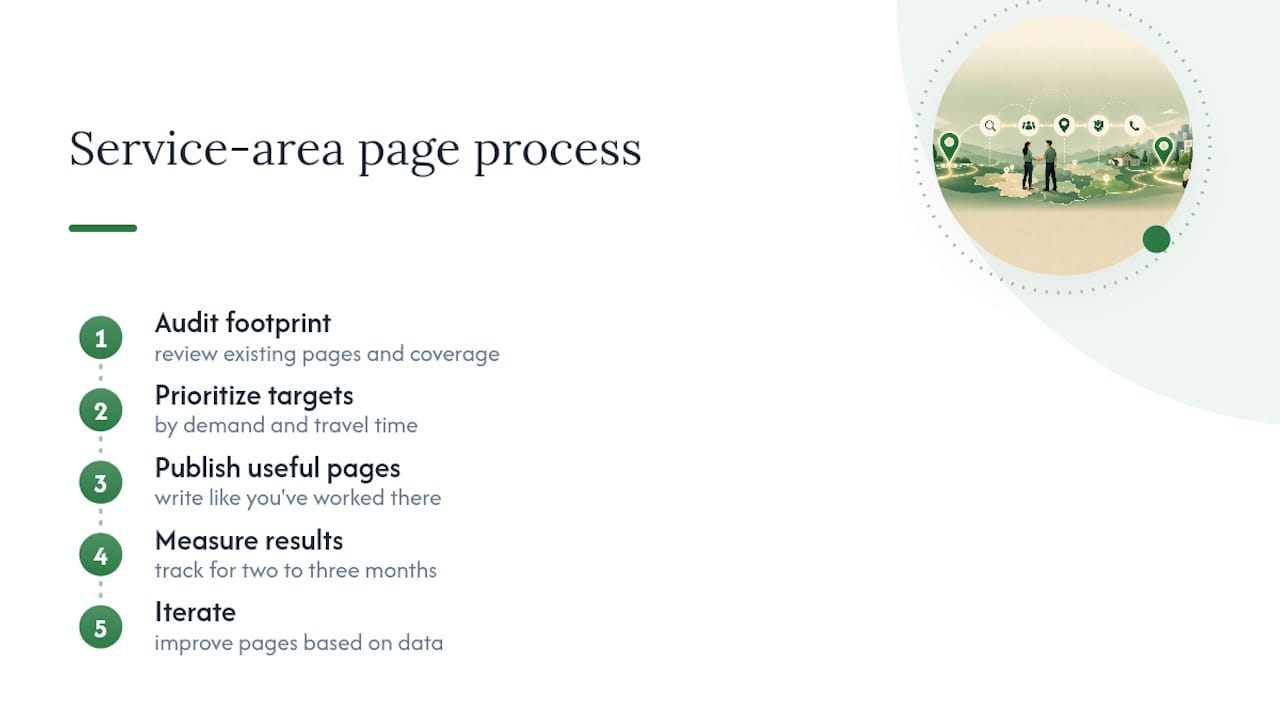
The process that actually works is boring and repeatable: audit your current footprint, prioritize by demand and travel time, publish pages that read like they were written by someone who's actually worked in that city, measure for two to three months, then iterate. Businesses that skip the measurement step usually can't tell you which pages are earning their keep.
— Anas
Get Hands-On Help Building Pages That Convert
An alternative to guessing your way through SAP strategy is to get site architecture, city-specific copywriting, schema markup, and call-tracking set up by someone who manages every account directly rather than outsourcing the work.
If you're evaluating agencies for this kind of project, ask pointed questions before signing anything: What proof do you have that past SAP work drove actual phone calls, not just impressions? What KPIs will you report on monthly? Do I own the content, schema, and tracking setup if we part ways? Those three questions separate agencies that build real assets from ones that lock you into a black box.
Seohoneybadger pairs Google Business Profile management with local SEO services built specifically around this kind of city-by-city page strategy, and offers transparent, month-to-month pricing so you're never stuck in a contract that outlives its results. If you're in the Scottsdale area, take a look at the Scottsdale SEO service page and request a discovery call to see what a prioritized, 2 to 5 city SAP plan would look like for your business.
Sources
- Service area pages: Boost local SEO across locations
- An update on doorway pages
- Schema
- Service area (ArcGIS) documentation