
You can't delete reviews yourself, but fake or policy-violating Google reviews can be removed once you document them and report them under the correct policy. The first 24 to 48 hours matter most: screenshot everything, match each review to a specific policy violation, and file the report. If Google denies it, escalate through the Reviews Management Tool's one-time appeal, and if you're facing threats tied to payment demands, skip straight to the Merchant Extortion form.
TL;DR:
- Most fake reviews are posted in clusters with similar phrasing from new accounts created the same week, often referencing unavailable or incorrect service details.
- Accurate documentation requires full screenshots, review URLs, profile history, and timestamps, as Google's automated detection cannot catch more sophisticated fake reviews.
- Reporting must be precise, matching the review to the correct policy category, and escalation via the Reviews Management Tool or Merchant Extortion form is necessary if initial reports are denied.
- Vague appeals rarely succeed; effective appeals are concise, policy-specific, and include concrete evidence like account creation date and transaction mismatches.
- Handling large waves or extortion threats benefits from professional management, which involves ongoing profile monitoring, rapid documentation, escalation, and review rebuilding efforts.
Table of Contents
- How to Spot Fake or Coordinated Reviews and Preserve Evidence
- How Do You Report a Fake Review on Google Maps?
- When Should You Escalate to the Reviews Management Tool?
- What to Do When Reviews Are Tied to Extortion Threats
- How Should You Respond Publicly While a Report Is Pending?
- What Are Your Legal Options Against Fake Reviews?
- How Honey Badger SEO Handles Fake-Review Incidents
- Realistic Timelines and What Success Actually Looks Like
- Get Managed Help for Google Reviews and Reputation Recovery
- Sources
- FAQ
How to Spot Fake or Coordinated Reviews and Preserve Evidence
Fake reviews rarely stand alone. They tend to arrive in clusters, share odd phrasing, or come from accounts with no real history. Once you know the pattern, spotting the next one takes seconds instead of minutes.
Common signals worth flagging:
- A reviewer account created the same week the review posted, with zero other reviews
- Nearly identical wording across several 1-star reviews posted within hours of each other
- A complaint about a service, location, or staff member you don't actually have
- A rating that references an appointment date when you were closed, fully booked, or not yet operating
- A sudden burst of five or more negative reviews in a single day after a normal, quiet pattern
Google's own contribution policy spells out what counts as fake or misleading content, and matching a review against that specific language is what separates a report that gets ignored from one that gets acted on, according to Google's user-contributed content policy.
Speed matters here for a reason most owners miss: the reviewer account itself can disappear, or the review can get edited or deleted by the poster before you've captured proof it ever existed. Once that happens, you're reporting something Google can no longer see, which weakens your case even if the damage to your rating is already done.
Your documentation checklist:
- Full-page screenshot showing the reviewer's name, star rating, date, and review text together (not cropped)
- The review's shareable URL, pulled directly from the three-dot menu on the review itself
- A screenshot of the reviewer's profile and their review history, if visible
- An export from your CRM, booking software, or point-of-sale system showing no matching customer or transaction
- Timestamps on every piece of evidence, since Google's team will ask when you first observed the review
Google removed a very large number of fake reviews across its platform in 2024 through automated detection, according to industry roundups tracking Google's enforcement. That scale sounds reassuring, but it also explains why individual cases still slip through: automated systems catch obvious spam and bot networks, not a competitor's cousin leaving a one-off fake review with a burner Gmail account. That case is yours to document and report.
Pro Tip: Save every screenshot to a dated folder named after the reviewer's account, not a generic "reviews" folder. When you have five disputed reviews going through appeals at once, that habit is the only thing keeping your evidence from turning into a mess.
How Do You Report a Fake Review on Google Maps?
Reporting a fake review takes about two minutes once you know which screen to use. The mechanics are simple; the part owners get wrong is the policy selection, which determines whether Google's system routes your report to a reviewer who actually looks at it.
- Open the review either in Google Maps or directly in your Google Business Profile dashboard under the Reviews tab.
- Click the three-dot menu that appears next to the review.
- Select Report review from the dropdown.
- Choose the policy category that most precisely matches what happened. Options typically include Fake & Misleading Content, Conflict of Interest, Spam, Harassment, and Off-topic.
- Add a short explanation, then submit.
That fourth step is where most reports fail. Picking "Spam" for a review that's actually a conflict of interest, like a competitor posing as a customer, often triggers an automatic rejection because the system checks your claim against the category you selected, according to Google's contribution policy guidance. One tight policy claim beats a rambling complaint about being treated unfairly.
Structure your report text in two parts: one sentence stating the exact policy violation, followed by two lines of concrete evidence. Something like: "This review violates Google's Conflict of Interest policy. The reviewer has no matching record in our booking system for the stated appointment date, and their profile shows reviews exclusively for our direct competitors in the same category." That's specific enough for a human reviewer to act on without extra back and forth.
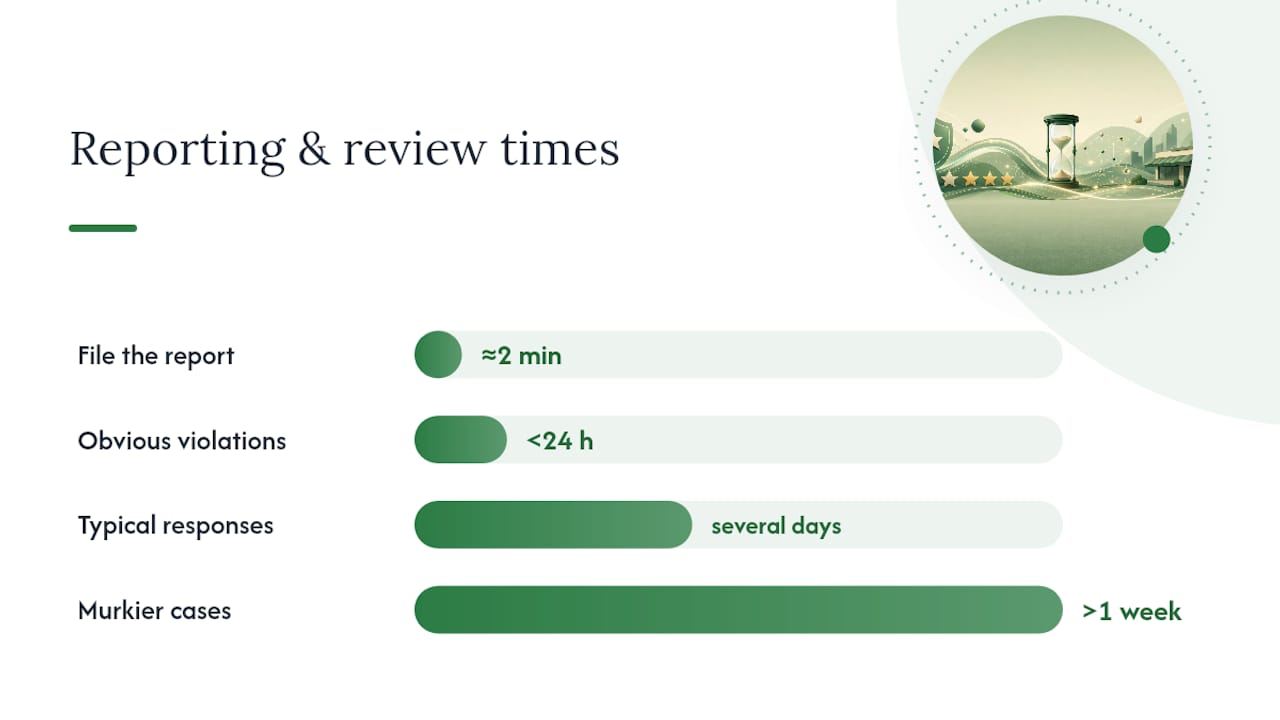
Google's own support documentation lays out this exact flow and confirms that responses generally arrive within several days of submission, though obvious violations sometimes clear in under 24 hours and murkier cases can stretch past a week.
Pro Tip: File the report the same day you spot the review, even if your evidence folder isn't finished. You can add supporting details in the follow-up appeal, but the initial report timestamp works in your favor if the case ever needs escalation.
When Should You Escalate to the Reviews Management Tool?
Escalate when your first report gets denied, when Google never responds within a week, or when you're dealing with several problematic reviews at once and need a way to track them all in one place. The basic report flow gives you no visibility once submitted. The Reviews Management Tool does, and it's also where your one-time appeal lives if that first report gets rejected.
The appeal is exactly that: one shot. You can't resubmit the same review for reconsideration a second time, so vague language like "this review is fake" almost never works. Practitioner guides that track outcomes across dozens of cases consistently find that appeals citing a specific policy alongside concrete evidence succeed far more often than broad complaints, according to analysis from ReviewRoket.
Build your appeal around three elements:
- One sentence naming the exact Google policy violated, matching the language from the original report
- A short, specific list of evidence points: reviewer account creation date, your CRM search results, or the mismatch between the claimed visit and your actual hours
- Direct links to the review itself and to any supporting files or screenshots, rather than describing them in prose
Keep the whole thing under 400 words. Reviewers moving through a queue respond to precision, not length.
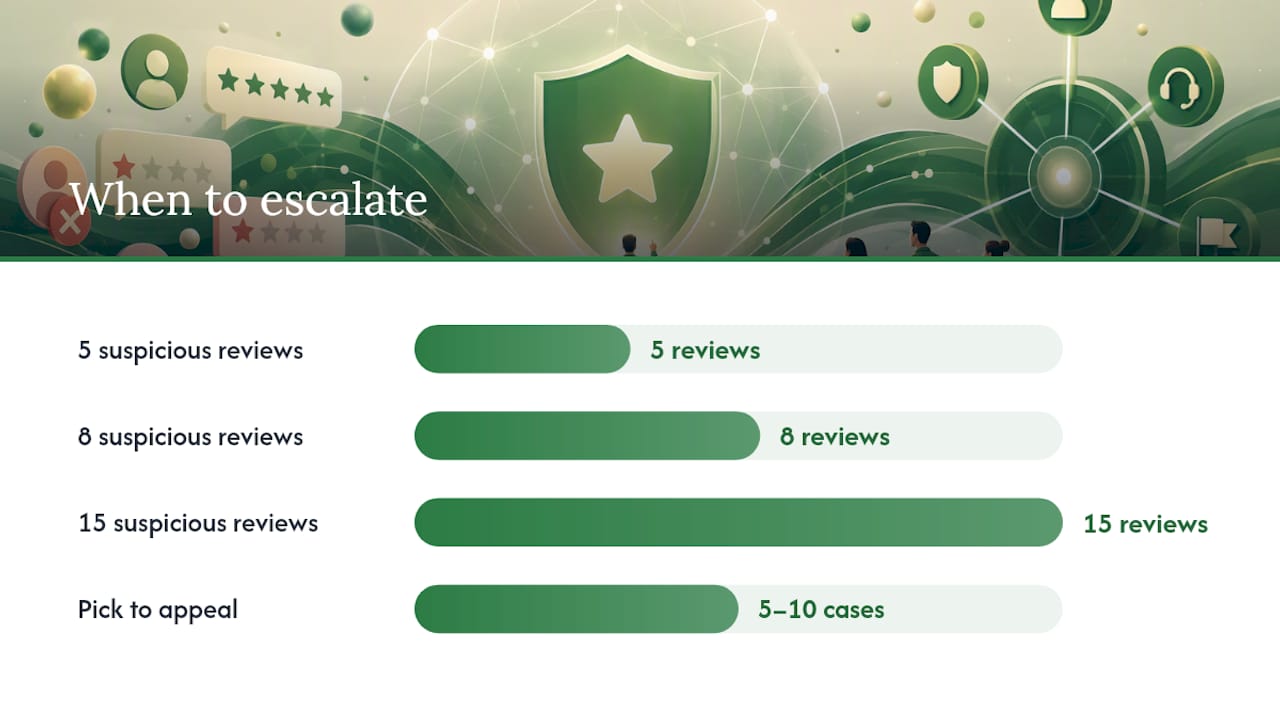
If you're facing five, eight, or fifteen suspicious reviews at once, don't spread thin appeals across all of them. Triage: pick the strongest 5 to 10 cases where you have the clearest evidence, no matching transaction, obviously synthetic account patterns, or linked extortion messages, and put your full effort into those, according to guidance from TrueReview's removal playbook. A thin appeal on a weak case can waste your single shot on a review you were never going to win anyway.
Pro Tip: Before appealing, reread your original report. If the appeal repeats it word for word with no new evidence, Google's reviewer has no reason to reverse the first decision.
What to Do When Reviews Are Tied to Extortion Threats
Extortion follows a recognizable pattern: a wave of negative reviews lands, then a message arrives demanding payment, a free service, or some other concession in exchange for taking them down. Never pay. Paying confirms the tactic works and invites a repeat visit, and it also hands Google's investigators a weaker case, since the paper trail now shows you engaged rather than reported.
Build the evidence package in this order:
- Screenshots of every message or email demanding payment, with timestamps and any visible contact details (phone number, email, social handle) preserved, not cropped out
- A simple table linking each disputed review to the corresponding threat or message, so the connection is obvious at a glance
- Shareable URLs for every review involved
- Records showing no matching transaction, appointment, or customer record for each reviewer
| Evidence Type | What It Proves | Where to Get It |
|---|---|---|
| Payment demand message | Extortion intent | Email, text, or social DM screenshots |
| Review-to-threat linkage | Reviews are coordinated, not organic | Manual table matching review URL to message |
| Transaction records | No real customer relationship exists | CRM, POS, or booking software export |
Once your package is assembled, submit through Google's Merchant Extortion form rather than the standard review report. This channel routes directly toward Google's Trust & Safety team instead of the general review queue, and consolidated evidence with a clear linkage table gives Product Experts on Google's support forums something concrete to escalate, according to community guidance on merchant extortion escalation. Ask for a Case ID once you've submitted, and reference it in any follow-up. Expect a longer wait than a standard report, often more than a week, since these cases involve manual investigation rather than automated matching.
How Should You Respond Publicly While a Report Is Pending?
Reply to the review, but keep it short and neutral. A response that argues, accuses, or names the reviewer directly can look worse to a potential customer scrolling past than the original fake review did. Something like: "We take all reviews seriously and have no record matching this visit in our system. Please contact us directly so we can look into this." That signals you checked your records without escalating the fight in public.
While you wait for a decision, work on three things in parallel:
- Ask recent, genuine customers for reviews to dilute the impact of the fake ones on your average rating
- Watch for repeat posting patterns, since coordinated attacks often come in a second or third wave days apart
- Log every inbound message or call related to the incident, even ones that seem unrelated, since patterns sometimes only become visible after a few weeks
New legitimate reviews do more for your visible rating than most owners expect. A single fake 1-star review barely moves a profile sitting at 40 reviews and a 4.7 average, but it can devastate a newer profile with only eight reviews total. Knowing where your business sits on that curve tells you how urgently to solicit fresh reviews versus focus entirely on removal. A structured approach to ongoing reputation management, like this step-by-step guide for small businesses, can help you build that review velocity habit before the next incident hits.
Pro Tip: Never mention "fake review" or "bot" in your public reply. If the report later gets denied, that language sits there permanently, undermining your own credibility with future customers reading the thread.
What Are Your Legal Options Against Fake Reviews?
Legal action exists, but it's a slower and more expensive lever than Google's own reporting system, and it works best as a follow-up to failed platform escalation rather than a first move.
The Federal Trade Commission's final rule, effective October 21, 2024, bans the sale, purchase, or procurement of fake reviews and testimonials outright, opening the door to civil penalties for violators, according to the FTC's official announcement. That's a meaningful shift: businesses paying for fake reviews, or competitors orchestrating them as a service, now face federal enforcement risk that didn't exist in the same form before.
A few things to keep in mind before involving lawyers:
- Suing Google directly over a review almost never succeeds, since platforms are broadly shielded from liability for third-party content
- Defamation claims target the reviewer, not the platform, and usually require identifying who actually wrote it
- A subpoena can compel Google to reveal account information tied to an anonymous reviewer, but that process takes weeks and legal fees to pursue
- Attorneys typically want the same evidence package Google asks for: screenshots, transaction mismatches, and any direct threats, before they'll evaluate whether a case is worth filing
Reserve legal counsel for cases involving explicit extortion, repeated targeted harassment, or clear reputational damage tied to a lost contract or client, where the dollar amount at stake justifies the cost of pursuing it.
How Honey Badger SEO Handles Fake-Review Incidents
Managing a fake-review incident well comes down to speed and precise documentation, the same discipline that runs through every step above. Honey Badger SEO handles Google Business Profile management for local service businesses, which means fake and coordinated reviews show up as a routine part of the GBP optimization work done for clients, not an occasional emergency.
The managed workflow follows four stages: detect the review through ongoing profile monitoring, document it against the specific policy it violates, escalate through the correct channel (standard report, appeal, or Merchant Extortion form), and then work on recovery, soliciting fresh reviews and tracking rating movement until the profile stabilizes. Results from that process show up in real client case studies.
DIY works fine for a single, obvious fake review with clean evidence. Once you're facing a coordinated wave, an extortion threat, or a profile where you can't keep up with monitoring alongside running the business, that's the point to bring in someone who handles this daily.
Realistic Timelines and What Success Actually Looks Like
Obvious policy violations may clear quickly; most cases take several days, and appeals or Merchant Extortion cases often require over a week, based on reported timelines from removal case tracking. Success isn't always outright deletion. Sometimes it's a corrected public record and a restored average rating.
Track three numbers through the incident: review velocity (new reviews per month), your rolling average rating, and the conversion rate from profile views to calls or bookings. If removal never comes through but your rating recovers because genuine reviews outpaced the fake ones, that's still a win worth counting.
— Anas
Get Managed Help for Google Reviews and Reputation Recovery
Seohoneybadger is the alternative to spending your evenings screenshotting reviews and rewriting appeals yourself: one team handles detection, documentation, and escalation for you, month to month, with no long-term contract locking you in.
Fake reviews rarely show up alone, and catching them fast requires someone actually watching your profile, not checking it once a month when you remember. Honey Badger SEO's Google Business Profile management covers exactly this: ongoing review monitoring, evidence collection the moment a suspicious review lands, escalation through the correct Google channel, and the follow-up work of rebuilding your rating with legitimate reviews afterward. If your business runs on phone calls and local visibility, that profile is too valuable to manage reactively.
Local SEO and Google Business Profile services start from $2,000 per month, handled personally with no outsourced account managers passing your case around. If a fake review incident is active right now, or you'd rather not be the one monitoring for the next one, reach out through the GBP services page to see what a managed setup looks like for your business.
Sources
- Federal Trade Commission announces final rule banning fake reviews and testimonials
- How to Remove Fake Google Reviews: Step-by-Step for 2026
FAQ
How Do I Filter Out Fake Google Reviews?
You can't filter fake reviews from public view the way you'd filter a spreadsheet. Reporting under the correct policy category is the only mechanism that removes them, since Google doesn't offer a business-side toggle to hide specific reviews.
How Do I Stop Someone From Posting Fake Google Reviews?
You can't fully prevent someone determined to post a fake review, but fast reporting under the correct policy category and consistent profile monitoring reduce how long any single fake review stays visible. Repeat offenders tied to extortion should go straight to Google's Merchant Extortion form rather than the standard report flow.
How Do I Delete a Fake Google Review?
You can't delete a review directly. You report it through the three-dot menu, selecting the exact policy it violates, and Google's team decides whether to remove it, typically within several days.
Is Faking Google Reviews Illegal?
Yes. The FTC's final rule, effective October 21, 2024, makes selling, buying, or procuring fake reviews illegal and enables civil penalties against violators.
What Does Honey Badger SEO Charge for Google Business Profile Management?
Local SEO and Google Business Profile management through Honey Badger SEO starts from $2,000 per month, covering ongoing monitoring, review strategy, and escalation support as part of the broader engagement.