
Yes, you can merge Google Business Profiles, but only when both listings represent the same business at the same address. If you created a duplicate inside your own account, remove it and your verified listing stays intact. If two live profiles exist on Maps, report a suggestion to request a merge. If someone else owns the verified profile, request ownership before you touch anything else.
TL;DR:
- Merging is only possible when both profiles represent the same business at the exact same address, requiring proof such as signage or utility bills.
- Owners should verify and confirm actual ownership before proceeding with removal or merge requests, especially for profiles controlled by others.
- When merging live profiles on Maps, descriptions must include consistent details like the same phone number and address; false duplicates of different businesses sharing a location should stay separate.
- Review counts and verification status guide which listing to keep, but deleting a verified profile with reviews can permanently erase valuable reputation.
- Using a professional service can simplify ownership disputes, merge requests, and post-merge cleanup, reducing risks of losing reviews or errors in the process.
Table of Contents
- How to Merge Duplicate Google Business Profiles Step by Step
- When Should Two Google Business Profiles Stay Separate?
- What Happens to Reviews and Rankings After a Merge?
- Managing Multiple Locations With Business Profile Manager
- Honey Badger SEO's Pre-Merge Checklist
- Why Owners Overcomplicate This Decision
- Prefer a Managed Approach to Fixing Your GBP?
- Sources
- FAQ
How to Merge Duplicate Google Business Profiles Step by Step
The order matters here. Fix ownership questions first, then decide whether to remove, merge, or leave things alone. Skip a step and you risk erasing years of review history on a listing you actually control.
Step 1: Find every version of your listing. Search your business name on Google, check Google Maps directly, and log into Business Profile Manager to see what's tied to your account. A business that's changed hands, moved addresses, or been claimed by an old employee often ends up with three or four ghost listings scattered across these views.
Step 2: Figure out which listing is worth keeping. Compare review counts, the primary website URL, photo volume, and which one carries a verified badge. The listing with more reviews and an active verification almost always becomes the one you preserve, and the other one becomes the target for removal or merge.
Step 3: Remove duplicates inside your own account. If you accidentally created a second profile under your own login, go to Business Profile Manager, select the duplicate, and remove it. Google confirms this won't affect your original verified listing as long as the one you keep stays untouched.
Step 4: Request a merge for duplicates on Maps. When two separate profiles are both live and public on Google Maps, and neither is under your direct control:
- Open Google Maps and search for the duplicate listing.
- Select "Suggest an edit" or "Report a problem."
- Choose the "duplicate" option and note which listing should be the surviving one.
- Describe why the two profiles represent the same business (same phone number, same address, same owner).
- Attach screenshots showing signage, a business license, or utility bills if you have them.
Google reviews every merge suggestion submitted through Maps before acting on it, so this isn't instant.
Step 5: Request ownership if someone else controls the verified listing. Sometimes the "duplicate" is actually the real listing, and it's owned by a past employee, a previous manager, or a marketing vendor who never handed over access. In that case, request ownership through Business Profile Manager instead of trying to merge or remove anything. Google gives the current owner a response window before granting access to a new claimant.
Pro Tip: Screenshot both listings, including their review sections and photo galleries, before you submit any merge or removal request. If Google's system moves faster than expected, you want proof of what existed before.
When Should Two Google Business Profiles Stay Separate?
Not every duplicate-looking listing is actually a duplicate. Google's merge rule is strict: profiles combine only when they represent the same business at the exact same address. Two legally distinct businesses sharing a building, a strip mall unit, or a shared entrance often trigger false duplicate flags.
Keep listings separate when:
- Each business operates under a different legal entity, even at the same street address.
- The businesses offer distinct services and maintain separate signage or suite numbers.
- One business is a franchise location with its own licensing separate from a neighboring tenant.
If Google mistakenly marks two eligible businesses as duplicates, you can appeal. Google may ask for evidence like permanent signage showing both businesses operate independently at that location.
Here's the part owners get wrong most often: deleting a verified, publicly listed profile because it "looks like" the wrong one. If that profile has years of reviews and active verification, deleting it destroys that equity permanently. Only delete a profile you're certain you created by accident, and never delete one you don't have direct login access to confirm.
Pro Tip: Before removing anything, log into the account and check the verification status yourself. Never trust a screenshot someone else sends you.
What Happens to Reviews and Rankings After a Merge?
Reviews from both profiles combine into one total once a merge processes. Replies to those reviews often don't survive the move, according to Google's own support community guidance on merged profiles. If you've spent months writing thoughtful responses to customer feedback, export or screenshot that content first.
Expect some visibility flux during processing. Rankings and photo displays can shift for a few days while Google's system reconciles the two data sets.
- Check the combined review count in Business Profile Manager once the merge completes.
- Confirm the primary website URL and phone number carried over correctly.
- Re-post any missing attributes, business posts, or photos that didn't transfer.
- Contact Google support through Business Profile Manager if reviews or verification status look wrong after a week.
Managing Multiple Locations With Business Profile Manager
Owners running several locations shouldn't attempt one-off merges for each address. Business Profile Manager supports creating groups and transferring locations in bulk, which is the safer path for anyone managing five, ten, or fifty listings.
- Create a business group inside Business Profile Manager.
- Add or transfer existing locations into that group.
- Invite team members or managers with appropriate access roles.
- Look for the green checkmark confirming bulk verification across the group.
Transferring locations between separate organizations has strict eligibility rules. It typically requires matching primary owners or organization-level access, so cross-organization transfers usually need direct contact with Google support rather than a self-service fix.
Honey Badger SEO's Pre-Merge Checklist
Before touching any merge request, export your reviews, screenshot every reply, and confirm which listing is verified. Copy your business description, photos, and post history somewhere safe.
The most common mistake we see: an owner deletes the verified profile because it looked redundant, then loses months of review history. Others merge two genuinely separate businesses sharing an address, triggering an appeal process that takes weeks.
Pro Tip: If you manage more than one location, a GBP optimization service can handle ownership negotiation and post-merge cleanup so nothing gets lost in the process.
Why Owners Overcomplicate This Decision
Most advice on merging profiles treats it like a technical puzzle. It isn't. It's a risk management decision, and the biggest risk isn't picking the wrong Maps setting. It's acting before you know who actually owns what.
Conventional guidance tends to jump straight to "here's how to merge," skipping the harder question: should this merge happen at all? A risk-averse framework that prioritizes removal over merging, and ownership requests over guessing, protects far more listing equity than rushing toward the fastest fix.
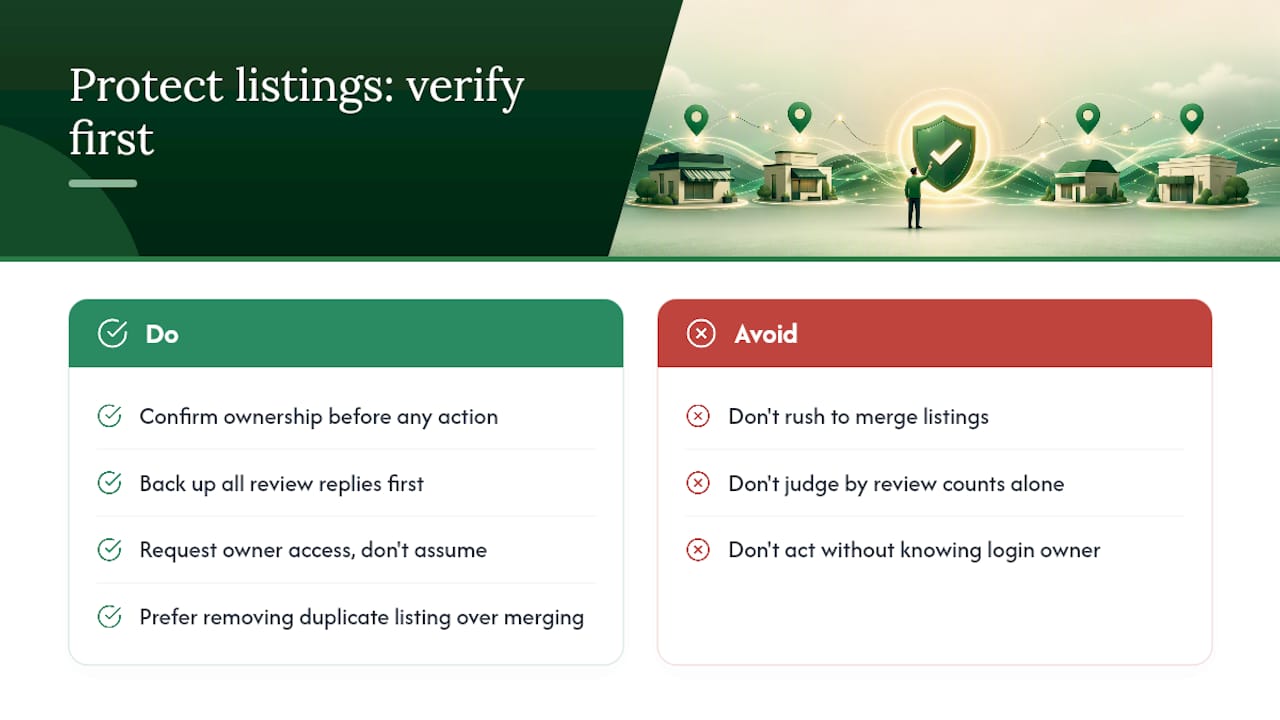
What gets underestimated: verification status. Owners fixate on review counts and forget to check who actually controls the login. That's backwards. Confirm ownership first, every time, before deciding whether to remove, merge, or request access.
If you take one thing from this: back up your review replies before you submit anything to Google. That single habit prevents the most common regret owners report after a merge goes through.
— Anas
Prefer a Managed Approach to Fixing Your GBP?
A managed service is an alternative to guessing your way through Google's merge process alone, sending in a request, and hoping nothing important disappears. Such a service can handle ownership negotiation, submit merge and removal requests correctly the first time, and clean up the profile afterward so your reviews, photos, and business details land where they should.
Our Google Business Profile Optimization service covers verification, ownership disputes, merge requests, and the post-merge monitoring most owners skip entirely. Such services often run on a transparent, month-to-month arrangement without long-term contracts, with clients owning their digital assets from day one. If your business operates near Scottsdale, our local SEO team can also fold this cleanup into a broader visibility strategy. For owners managing complex, multi-location automation, partners like BabyLoveGrowth offer a complementary route worth a look.
Contact us for a consultation, and we'll tell you exactly what your profile needs before you request anything from Google.
FAQ
Is There a Way to Merge Two Google Profiles?
Yes, but only if both represent the same business at the same address. Report a suggestion on Google Maps for live duplicates, or remove the duplicate directly if it exists inside your own account.
Can I Merge Two Google Workspace Accounts Into One?
Google Workspace accounts and Google Business Profiles are separate systems. Business Profiles merge through Maps requests or Business Profile Manager; Workspace accounts don't merge the same way and typically require a data migration instead.
Why Do I Have Two Business Profiles on Google?
This usually happens when a previous owner, employee, or marketing vendor created a listing that duplicates one you set up later, or when a business moved addresses and Google generated a fresh profile automatically.
Can I Merge Two Google Accounts Together?
Personal Google accounts don't merge. If you mean two Business Profile listings for the same business, follow the removal or Maps-suggestion process described above rather than trying to combine login credentials.
How Long Does It Take to Merge Duplicate Listings?
Google doesn't publish a fixed timeline. Removal of a duplicate inside your own account typically resolves quickly, while merge requests submitted through Maps go through a review process before you see results.