
Build one defensible, conversion-focused location page for every real footprint your business has, not a template with the city name swapped out. Each page needs NAP details, hours, a map, local photos, real reviews, LocalBusiness schema, and a clear call to action. Link it from a locations hub and your Google Business Profile, treat it as both an organic and paid landing page, and structure the facts so both Google and AI systems can scan and cite them.
TL;DR:
- Building one strong, unique location page per physical storefront or dedicated service area boosts local relevance and search visibility over generic city templates.
- Location pages should include specific details such as staff, photos, reviews, schema markup, and localized content to avoid duplicate content penalties and enhance AI parsing.
- Regularly update each location page with fresh reviews, local news, and event references to signal activity and improve rankings in both organic and AI-driven searches.
- Internal linking and consistent NAP information across all platforms prevent cannibalization and reinforce local authority in search engine rankings.
- For mobile and voice search, emphasize clear, scannable facts like hours, contact links, and location-specific FAQs to improve user experience and visibility in voice queries.
Table of Contents
- What Is a Location Page (and How Is It Different From a Service-Area Page)?
- Should This Location Page Exist? A Decision Checklist
- Location Page Template: The Physical Storefront Module
- Template: The Service-Area Page (No Storefront, No Problem)
- On-Page Essentials: NAP, Schema, Maps, and Reviews Done Right
- Avoiding Doorway Pages and Content Cannibalization
- Site Architecture: Hub-and-Spoke Structure for Multiple Locations
- Measuring Performance and Fixing Underperforming Pages
- Getting Location Pages Cited by AI Search Tools
- Optimizing Location Pages for Mobile and Voice Search
- Local Keyword Research for Location Pages
- Technical SEO Details Unique to Location Pages
- Getting More Local Reviews and Showing Them Off
- Beyond NAP: Using Local Events and News to Build Relevance
- How We Decide When to Build or Consolidate a Location Page
- Build Location Pages That Actually Convert, Not Just Rank
- Sources
- FAQ
What Is a Location Page (and How Is It Different From a Service-Area Page)?
A location page represents a specific, physical address where customers can walk in, get served, or meet your staff. A service-area page covers a region a business serves without a storefront there, common for plumbers, HVAC techs, and other mobile trades. A geo page, often the weakest of the three, exists mostly to catch a city name in a search query with little else behind it.
Each type maps to different intent and different SERP real estate. A physical location page targets "near me" and map-pack searches from people ready to visit. A service-area page targets people who want someone to come to them, and it competes more in organic results and AI-generated answers than in the map pack. A geo page rarely earns either, because it lacks the substance search engines look for.
The type you build should match reality:
- One office with five service cities: build a single strong location page and let a service-area page or section cover the rest.
- Ten storefronts across a metro area: build ten physical location pages, each with unique staff, photos, and reviews.
- A mobile-only business with no office: skip the physical template entirely and build service-area pages organized by county or drive-time radius.
Aligning your on-page facts with your Google Business Profile (same name, address, phone) is a foundational relevancy signal, and it applies no matter which page type you choose.
Should This Location Page Exist? A Decision Checklist
Not every city deserves its own page. Publishing one anyway is how businesses end up with a stack of thin pages that hurt more than they help, since pages that provide real value at that specific location are the ones that survive scrutiny, not the ones that merely exist.
Run each candidate location through this checklist before you build anything:
- Do you have a real, sustained presence there, either a physical address or a documented service history?
- Can you populate the page with content unique to that location, such as staff names, project photos, or client reviews from that area?
- Is there measurable demand, whether that's search volume for that city or existing lead data showing people already ask for you there?
- Who owns this page long-term, and how often will it get updated?
If a location fails two or more of these, don't force it. Fold that city into a broader service-area or regional page instead. A genuinely local piece of evidence, like one staff bio or one job-site photo, is often the deciding factor between a page worth building and a doorway page waiting to get flagged.
Pro Tip: If you can't name one specific person who will update a location page's photos and reviews every quarter, you don't have a location page strategy yet. You have a liability.
Location Page Template: The Physical Storefront Module
A physical location page earns its ranking through specificity, not word count. Build it in this order:
- Hero section: a location-specific H1 (e.g., "Dental Care in Old Town Scottsdale") with a one or two sentence intro naming a nearby landmark or neighborhood, not a generic city reference.
- NAP block: business name, full address, and phone number formatted identically to your Google Business Profile listing, placed above the fold.
- Map and directions: an embedded map using canonical coordinates, plus hours, parking notes, and accessibility details.
- Services at this location: what's actually offered there, since not every location in a multi-site business offers the same menu.
- Staff and team: real names and photos of the people who work at that specific address, not stock photography.
- Original photography: interior, exterior, and team shots taken at that location, never pulled from a corporate photo bank.
- Location-specific reviews: testimonials tied to that address, ideally pulled or excerpted from your Google Business Profile.
Most location pages that stall in rankings share one problem: thin content that merely swaps the city name while reusing every other sentence from a sister page. Google and AI search systems both parse for uniqueness, and a template with only the city changed reads as duplicate content no matter how many pages you publish.
On the technical side, implement LocalBusiness subtype JSON-LD (use the most specific subtype available, like Dentist or HVACBusiness rather than the generic LocalBusiness) with name, address, telephone, openingHours, geo coordinates, url, and aggregateRating fields populated. Add FAQ schema for the two or three questions locals actually ask, like parking availability or same-day appointments. Set a self-referencing canonical tag on every location page and confirm each one appears in your XML sitemap. Skipping this step is the single most common reason a well-written location page never shows up in search console coverage reports.
Template: The Service-Area Page (No Storefront, No Problem)
Mobile businesses, from insulation contractors to mobile med spas, need a different template because there's no address to anchor the page. The fix isn't to fake an address. It's to prove local experience without one.
Structure a service-area page around these elements:
- Coverage description: name the actual cities, counties, or neighborhoods you cover, along with a realistic service radius or drive-time boundary.
- Response expectations: state typical response times for that area, whether it's "same-day service in North Scottsdale" or "48-hour turnaround across Orange County."
- Link to your nearest office: even a service-area page benefits from linking back to the physical location dispatching the work.
- Local case studies or job examples: a finished project, a before-and-after set of photos, or a short write-up of a job completed in that specific area.
- Site-specific reviews: reviews or quotes from clients in that coverage zone, not a generic testimonial block reused across every area page.
- Schema: use the
areaServedfield in your LocalBusiness or Service schema to declare the geographic scope explicitly.
The trap most businesses fall into is building a service-area page that reads exactly like every other service-area page on the site, just with the city name changed in the H1. That's a textbook doorway page, and Google's guidance is clear that pages structured around the smallest defensible footprint, with real evidence behind each one, outperform a sprawling set of near-duplicate pages built to catch every zip code in a region.
Include at least one element that could not be copy-pasted onto a competitor's site: a named local partner, a specific permit or inspection reference, or a quoted client with a real first name and neighborhood. That single detail does more for credibility than another paragraph of generic service description.
On-Page Essentials: NAP, Schema, Maps, and Reviews Done Right
Consistency is the whole game with NAP data. Your business name, address, and phone number need to match character-for-character across your website, your Google Business Profile, and every citation source, including how you format suite numbers, abbreviations, and phone number punctuation. A phone number listed as "(480) 555-0110" on your site but "480.555.0110" on a directory is a small inconsistency that search engines still notice at scale.
| Element | What to include | Why it matters |
|---|---|---|
| NAP block | Name, address, phone, matched to GBP exactly | Core relevancy and verification signal |
| JSON-LD schema | name, address, telephone, openingHours, geo, url, aggregateRating | Feeds both search snippets and AI summaries |
| Map embed | Canonical lat/long coordinates, not a dropped pin | Prevents map-pack mismatches |
| Images | Original photos, descriptive alt text, compressed for load speed | Builds trust and passes Core Web Vitals checks |
| Reviews | Sourced from GBP, refreshed quarterly, tied to that address | Supports both local pack ranking and on-page trust |
Structured data does double duty now. Schema with LocalBusiness subtype and FAQ markup improves discoverability in classic search results and in AI-generated overviews, largely because both systems are hunting for facts they can lift cleanly rather than paragraphs they have to interpret.
Pro Tip: Run your JSON-LD through a schema validator every time you touch the page template. One missing closing bracket can silently break structured data across every location page built from that template, not just one.
Avoiding Doorway Pages and Content Cannibalization
That's the textbook definition of a doorway page, and it's exactly the pattern Backlinko's analysis of location pages flags as the most common reason these pages underperform or get filtered out of rankings entirely.
Set a minimum unique-content rule before you scale past two or three locations: every page needs at least one paragraph, one photo, and one review that could not exist on a sister page. Run a content-diff audit across your location pages periodically, comparing body text between pages targeting nearby cities, to catch templated bloat before Google does.
Watch for these red flags:
- Two location pages ranking for the same query, with neither one winning consistently (a sign of cannibalization).
- A page with declining impressions in Search Console despite no changes to search demand.
- A location with no fresh content, photos, or reviews added in over a year.
Pro Tip: If you can't write one unique, honest paragraph about a location, that's your answer. Consolidate it into a regional or service-area page instead of forcing a standalone one into existence.
Site Architecture: Hub-and-Spoke Structure for Multiple Locations
Pick one URL pattern and never deviate: either /locations/[city] or /[service]/[city], depending on whether locations or services are the primary axis of your business. Consistency here matters more than which pattern you choose, since mixing patterns confuses both crawlers and the internal linking you'll build later.
Build a central locations hub page that lists every location with crawlable links, not a dropdown menu that hides them from search engines. That hub belongs in your XML sitemap, and every individual location page should link back to it.
From there, connect the pages to each other:
- Link each location page to two or three nearby locations, so a customer (and a crawler) can navigate the network easily.
- Link each location page to the relevant service pages offered there.
- Link staff pages to their home location and vice versa.
- Set self-referencing canonicals on every page, and audit your Google Business Profile "website" field to confirm it points to the correct, live location URL.
Structuring around your real-world footprint with the smallest number of pages necessary prevents the internal competition that tanks rankings across an entire location network.
Measuring Performance and Fixing Underperforming Pages
Track five metrics per location page in Google Search Console: impressions, click-through rate, indexation status, local pack appearances, and the calls or form submissions that page actually generates. A page with high impressions but low clicks usually has a title tag or snippet problem. A page with no impressions at all usually has an indexation or internal linking problem.
Run this audit sequence quarterly:
- Pull a content-diff report comparing pages targeting nearby cities to catch templated overlap.
- Validate your schema markup with a structured data testing tool.
- Check the Search Console coverage report for crawl errors or "discovered, not indexed" pages.
- Test page speed, since slow-loading location pages lose mobile visitors before they see your phone number.
- Confirm reviews are current and visible on the page itself, not just on your GBP listing.
Prioritize fixes by effort versus payoff. Fixing broken schema or a wrong GBP website link takes an hour and often produces an immediate lift. Adding a fresh local review or case study takes a week. Consolidating a failing page into a regional one is the long-term fix when a location simply never had enough substance to justify a standalone page.
Getting Location Pages Cited by AI Search Tools
AI-generated overviews pull facts, not prose. A location page written in dense paragraphs gets skipped in favor of a competitor's page that states hours, address, and services in short, scannable blocks with clear headers. Structuring content as fact blocks, FAQ-style questions, and small tables gives an AI system something clean to lift and cite.
Name-drop real local entities: the actual neighborhood, a nearby cross street, a well-known landmark. Generic city references don't carry the same weight as "two blocks from Old Town Scottsdale's Fifth Avenue shops" when a system is deciding which source sounds authoritative.
AI-assisted search increasingly favors pages built around scannable facts and named local entities over long-form marketing copy. A page that states its hours, service area, and staff clearly in structured blocks has a real edge over one that buries that information in paragraphs.
FAQ markup and LocalBusiness schema aren't optional extras anymore. They're the format AI systems are built to parse first, and pages without them are competing at a structural disadvantage before a single word of content gets read.
Optimizing Location Pages for Mobile and Voice Search
Most local searches happen on a phone, often from someone standing outside deciding whether to walk in. That changes what "optimized" means for a location page. The phone number needs to be tap-to-call, not just readable text. The address needs a one-tap link to a maps app. Hours need to be visible without scrolling past a hero image that takes three seconds to load on a mobile connection.
Voice search adds another layer. Voice queries tend to be longer and more conversational: "is there a dentist open near me right now" instead of "dentist Scottsdale." Location pages that answer these naturally, through FAQ sections written in plain, conversational language, have a better shot at being the answer a voice assistant reads aloud.
Test your Core Web Vitals specifically on mobile, not just desktop, since Google's indexing and ranking decisions are mobile-first. A location page that scores well on a desktop connection but drags on a phone's cellular signal loses the exact customer most likely to convert, the one standing outside your door checking if you're open.
Keep critical information, phone number, hours, and address, above the fold on mobile. Everything else, staff bios, longer service descriptions, extended photo galleries, can live further down the page. The goal on a phone screen is answering the visitor's immediate question in the first five seconds, not the first scroll.
Local Keyword Research for Location Pages
Keyword research for a location page looks different from keyword research for a blog post. You're not chasing search volume alone. You're matching a specific page to a specific, geographically bound intent, and that means starting with the neighborhood terms your actual customers use, not just the city name.
Pull search terms from three sources: Google Search Console's existing query data for pages you already have, the autocomplete suggestions when you type your service plus a nearby neighborhood, and the "People also ask" boxes that show up for your core service terms. Neighborhood-level terms often carry lower volume but far higher intent, since someone searching "insulation contractor Old Town Scottsdale" is closer to hiring than someone searching "insulation contractor Arizona."
Map each location page to one primary term (typically service plus city) and two or three secondary variations (service plus neighborhood, service plus a nearby suburb). Avoid targeting the same primary term on two different location pages. That's the fastest route to the cannibalization problem covered earlier in this guide.
Don't ignore the questions embedded in local intent, either. "How much does insulation cost in Scottsdale" and "insulation contractor near Old Town Scottsdale" are different searches with different answers, and a well-built location page can answer both without splitting into two separate pages.
Technical SEO Details Unique to Location Pages
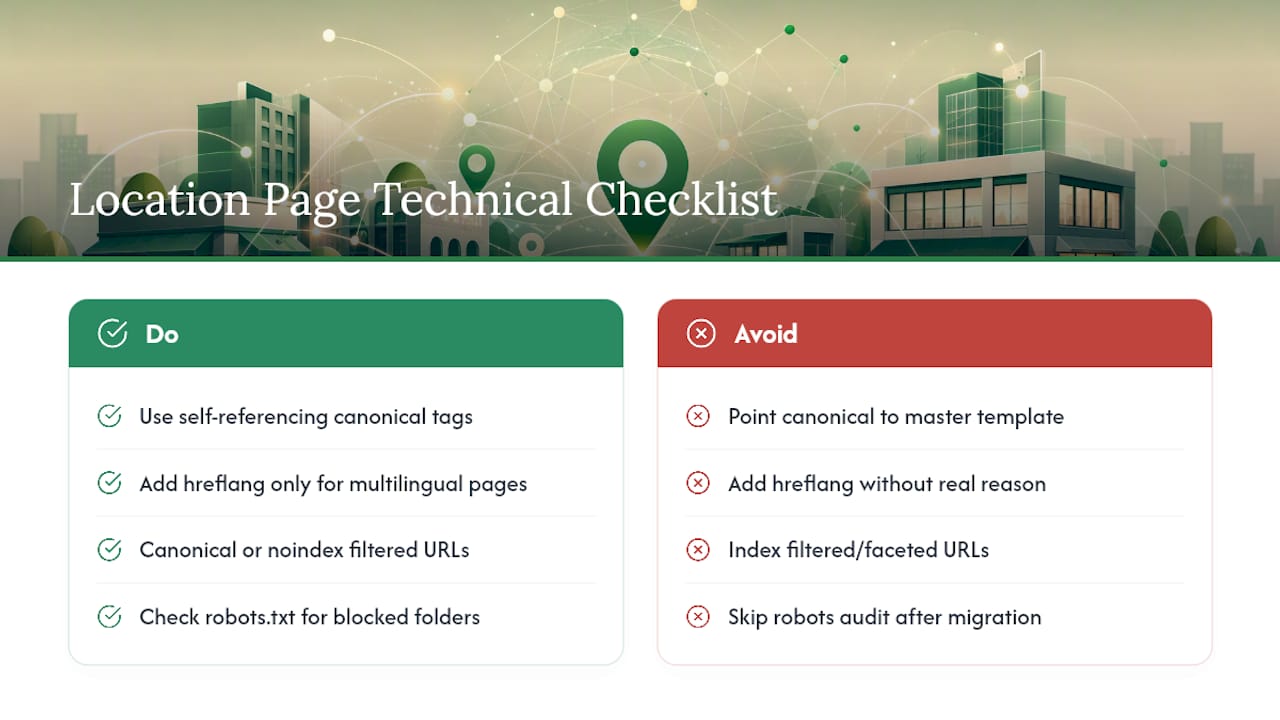
Canonical tags matter more on a multi-location site than almost anywhere else on the web, because the risk of near-duplicate content is built into the format. Every location page needs a self-referencing canonical tag pointing to itself, never to a "master" template page, or you risk telling Google to ignore the very pages you're trying to rank.
Hreflang tags come into play only if you're serving the same location page in multiple languages, which is common for markets with large bilingual populations. If you publish an English and a Spanish version of the same location page, hreflang tags tell search engines which version to serve to which searcher. Skip hreflang entirely if you're not running multilingual pages. Adding it without a genuine reason just adds a maintenance burden with no upside.
Pagination and faceted navigation on a locations hub page deserve their own scrutiny. If your hub page lets visitors filter by service or region, make sure those filtered URLs don't get indexed as separate, thin pages competing with your real location pages. A noindex tag or a canonical pointing back to the main hub handles this cleanly.
Finally, confirm your robots.txt file isn't accidentally blocking a location subfolder, a surprisingly common error on sites that migrated URL structures without auditing crawl access afterward. A location page that returns a 200 status but is quietly blocked from crawling will never show up no matter how well it's built.
Getting More Local Reviews and Showing Them Off
Reviews do double duty on a location page: they're social proof for visitors and a trust signal for search engines parsing aggregateRating schema. The businesses that consistently collect reviews treat it as a process, not an afterthought tacked onto an invoice email.
Ask at the moment of highest satisfaction, not days later in a generic follow-up email. For a service business, that's right after the job is finished and the customer has confirmed everything looks good. For a retail or office location, that's at checkout or after an appointment, with a direct link to your Google Business Profile review form rather than a generic "leave us a review" landing page.
Segment review requests by location whenever you have more than one storefront. A Google Business Profile review management workflow built around consistent timing and location-specific tracking catches problems early and keeps review volume climbing steadily instead of in occasional bursts.
Once reviews come in, don't let them sit exclusively on your GBP listing. Pull two or three recent, location-specific reviews directly onto that location's page, refreshed on a quarterly basis, and respond to every review, positive or negative, since response behavior is itself a visible trust signal to anyone reading the thread.
Beyond NAP: Using Local Events and News to Build Relevance
NAP details and schema markup are the floor, not the ceiling. What separates a location page that ranks from one that dominates is content tied to what's actually happening in that specific place right now.
Reference a local event your business sponsored or participated in. Mention a seasonal detail specific to that region, like storm-prep insulation demand ahead of a Southwest monsoon season, or note a nearby development that changed foot traffic for a retail location. This kind of detail is nearly impossible for a competitor to copy without also having a genuine presence there, which is exactly the point.

A short, dated update section, "Now serving the new development off Hayden Road" or "We sponsored the Scottsdale Fall Festival this October", gives search engines and AI systems a signal of freshness that a static page can't replicate. It also gives returning visitors and locals a reason to trust that the page reflects an active business, not an abandoned template.
This is where a Google Business Profile posting cadence tied to real local activity pays off twice: it feeds fresh content into your GBP listing and gives you material to periodically refresh into the location page itself, keeping both signals aligned instead of stale.
How We Decide When to Build or Consolidate a Location Page
Our workflow starts with an audit of every real footprint a client has, then we pilot one or two location pages before scaling to the rest. We measure results in Google Search Console and call tracking data before deciding whether to build out the remaining locations or fold weaker ones into a regional page.
Operationally, that means assigning one owner per location for reviews and photos, keeping the GBP listing and website NAP in lockstep, and setting a real update cadence rather than a "someday" one.
— Anas
Build Location Pages That Actually Convert, Not Just Rank
There are direct alternatives to hiring a generalist agency or trying to template this yourself. Some providers build and manage location pages, Google Business Profile optimization, and schema implementation as one connected system, not three disconnected vendors billing separately.
The outcome clients care about isn't a ranking screenshot. It's more phone calls from the right zip codes, cleaner governance across a dozen locations instead of a dozen inconsistent templates, and a page structure built to hold up under both Google's scrutiny and AI-driven search. If you run a multi-location business in Arizona, our Arizona SEO services team can walk through your current pages and flag exactly which ones need rebuilding, which need consolidating, and which are already solid. If you're closer to the Phoenix metro, our Scottsdale SEO team can start with a free audit of your existing location pages against the checklist in this guide.
Sources
The frameworks in this guide draw on Search Engine Land's location page guide, Backlinko's research on location page performance, and BrightLocal's guidance on unique, helpful location content.
For ongoing audits, use:
- Location pages: SEO guide | Search Engine Land
- Location pages for SEO (Backlinko)
- How to craft unique and helpful location pages (BrightLocal)
FAQ
Are Location Pages Good for SEO?
Yes, when each page has unique local content, correct schema, and matches your Google Business Profile, since aligned on-page and GBP facts are a core relevancy signal. A thin page that swaps only the city name typically hurts rankings instead of helping.
What Is Location-Based SEO?
Location-based SEO is the practice of optimizing web pages, listings, and content so a business ranks for searches tied to specific cities, neighborhoods, or service areas. It combines on-page signals like NAP consistency and schema with off-page signals like citations and Google Business Profile activity.
What Is a Location Page?
A location page is a dedicated web page representing one physical address or defined service area, built to rank for searches tied to that specific place and to convert visitors into calls or bookings. It differs from a generic city landing page in that it includes real, location-specific evidence like staff, photos, and reviews.
What Is Localization in SEO?
Localization in SEO means adapting content, keywords, and structured data to match the language, terminology, and geographic context of a specific market or region. For a location page, that means using neighborhood names locals actually search for, not just formal city or county designations.
How Many Location Pages Should a Business Build?
Build the smallest number of pages that reflects your real footprint, since structuring around real-world locations rather than every conceivable city prevents cannibalization. Consolidate weaker markets into a regional or service-area page rather than force a standalone page that can't carry unique content.