
Index coverage issues happen when Google Search Console reports that pages on your site were not indexed, whether by choice, by error, or by neglect. Your first move is not to panic and resubmit everything. Open the Page Indexing report, sort by Error status, and run URL Inspection on one important canonical page to see exactly what Google saw and why.
TL;DR:
- Most coverage spikes relate to recent site changes like sitemap updates, robots.txt modifications, or deployment errors, which can be identified in under 30 minutes.
- Excluded URLs are often safe, but unintentional exclusions, especially important pages appearing in the same bucket, require direct site fixes, not just resubmission requests.
- Common index errors like 5xx server errors, robots.txt blocking, or faulty redirects should be diagnosed with server logs, URL Inspection, and header checks before applying cures.
- Differentiating between "Crawled, not indexed" and "Discovered, not indexed" pages is crucial; the former relates to page quality or canonical issues, while the latter points to discoverability or crawl budget concerns.
- Effective troubleshooting hinges on pattern recognition, matching root causes to specific fixes, and validating changes via Search Console tools, not hurried bulk reindexing.
Table of Contents
- What Is the Fastest Way to Triage Index Coverage Issues?
- How Do You Read the Page Indexing Report?
- What Are the Most Common Indexing Errors and Their Fixes?
- Crawled vs. Discovered: Why These Two Statuses Need Different Fixes
- A Step-by-Step Workflow for Fixing Index Coverage Problems
- Which Tools Actually Confirm the Fix Worked?
- How Do You Prevent Index Coverage Issues Before They Start?
- What Does Index Coverage Recovery Look Like in Practice?
- What Most Guides Get Backwards About Index Coverage
- Get Hands-On Help Fixing Index Coverage Issues
- Sources
- FAQ
What Is the Fastest Way to Triage Index Coverage Issues?
You can catch the worst problems in under 30 minutes if you work in the right order. Skip the temptation to click through every excluded URL. Start wide, then narrow.
- Filter Coverage to "All submitted pages." This shows how your sitemap URLs are actually performing, not the noise from every URL Google has ever discovered on your domain.
- Scan Error counts for spikes. A jump from 3 errors to 300 almost always traces back to a specific event, not a slow decline.
- Cross-reference the spike date with recent deployments. Did a developer push a new robots.txt, a CMS update, or a sitemap regeneration around that date? Nine times out of ten, that is your smoking gun.
- Run URL Inspection on 3 to 5 representative URLs, not just one. Check the "Source" field to see whether the directive causing exclusion came from your site or from Google's own crawling decisions.
- Confirm nothing changed sitewide. Check your robots.txt file directly and search your page templates for an accidental global
noindextag, which is one of the most common self-inflicted wounds after a site migration or theme update. - If you see 5xx server errors, stop everything else and fix hosting first. A server that returns errors to Googlebot will throttle how often it comes back, which compounds every other problem on this list.
Pro Tip: Keep a simple changelog of every deployment, sitemap resubmission, and plugin update. When Coverage spikes, the first thing you should check is not Google, it's your own deployment history. Most "mystery" indexing problems have a very unmysterious cause sitting in a Git log.
This 30 minute pass will not fix anything by itself, but it tells you whether you are dealing with a server emergency, a self-inflicted blocking mistake, or a slower content quality problem that needs a different kind of fix.
How Do You Read the Page Indexing Report?
The Page indexing report sorts every URL Google has tried to crawl into one of four buckets, and misreading those buckets is where most webmasters waste time.
- Valid means the page is indexed and eligible to appear in search results. No action needed.
- Valid with warnings means it is indexed, but something is worth reviewing, like a page that's indexed despite being blocked by robots.txt for other users.
- Excluded means Google chose not to index the URL, and this bucket is enormous and mostly harmless. Pagination pages, parameter variants, and canonicalized duplicates all land here by design.
- Error means something actively broke, whether on your server or in your markup, and these deserve attention first.
The report also gives you an example URL drilldown for each status, a small sample of affected addresses rather than the full list. Google explicitly built the report this way so you inspect representative cases before mass-editing anything, and that sampling behavior is worth understanding before you assume you need to fix every single row.
Here's the statistic that resets expectations for most site owners: Google's own guidance states plainly that you should not expect every URL on a large site to be indexed. The goal is getting your important canonical pages indexed, not chasing 100% coverage across every thin, duplicate, or parameterized URL your CMS generates.
That distinction matters because the "Excluded" bucket contains three very different kinds of stories:
- Intentional exclusions you configured on purpose, like a
noindextag on a thank-you page or a filtered category URL you canonicalized to the main category. - Structural exclusions from pagination, faceted navigation, or session parameters that Google correctly deduplicates.
- Unintentional exclusions where a page you actually want ranking got swept into a
noindexrule or a bad canonical tag by mistake.
Your job is separating the third group from the first two. Pulling the example URLs for each status and checking whether they're pages you actually care about is the fastest way to do that. If your homepage, service pages, or top blog posts show up in an "Excluded" sample, that's your priority list. If it's filtered product variants and print-friendly duplicates, leave them alone.
One more thing worth knowing: the Source column tells you whether the exclusion signal came from your own site (a meta tag, a robots.txt rule, a canonical tag) or from Google's own algorithmic judgment about the URL. Site-caused issues are the ones you can fix directly and quickly. Google-judgment exclusions, like "duplicate, Google chose different canonical," usually mean you need to strengthen the page's uniqueness or fix your own canonical signals rather than expecting a quick toggle to solve it.
What Are the Most Common Indexing Errors and Their Fixes?
Every recurring index coverage problem traces back to one of a handful of root causes. Diagnose the pattern first, then apply the specific fix instead of guessing.
| Error type | How to diagnose it | The fix |
|---|---|---|
| Server error (5xx) | Check server logs for the exact timestamps Googlebot hit the URL; look for correlating spikes in CPU, memory, or database load | Fix the hosting or application issue causing the failure, then monitor logs for a repeat over the next several crawl cycles |
| Blocked by robots.txt | Run the exact URL through the robots.txt tester in Search Console | Remove or narrow the disallow rule if the URL should be crawlable; never block a URL you actually want indexed |
| Indexed though blocked by robots.txt | Check if external sites link to the blocked URL | Understand that Google can index a URL from external signals even when it can't crawl the page itself; unblock it if you want full control over the indexed snippet |
| Noindex detected | Inspect the URL live and check both the HTML meta tag and the HTTP response headers for an X-Robots-Tag | Remove the tag at the template or server config level if unintended, then request indexing |
| Redirect error or chain | Trace the full redirect path with a header-checking tool | Collapse multi-hop chains into a single 301 straight to the final canonical target |
| 404 / Not found | Decide whether the page has real backlinks, traffic history, or ranking value | Restore the content, 301 it to the closest relevant live page, or leave it 404 and let it drop naturally if it's genuinely gone |
| Structured data errors | Check the Enhancements reports for the specific schema type affected | Fix the invalid or missing required properties; this affects rich result eligibility, not indexing itself, but it's often diagnosed in the same sweep |
A few of these deserve more nuance than the table can hold.
The robots.txt and noindex interaction trips up more sites than any other item on this list. If you block a URL with robots.txt, Google never crawls it, which means it never sees a noindex tag placed on that same page. The URL can still get indexed based on anchor text and links pointing at it from elsewhere, producing a strange result: a page you thought you'd hidden shows up in search results anyway, sometimes with a blank or thin snippet. If your actual goal is removing a page from the index, the fix is counterintuitive: allow crawling and let the noindex tag do the work, rather than blocking access entirely.
Redirect chains deserve the same scrutiny. Each additional hop in a chain adds crawl overhead and increases the odds Googlebot gives up before reaching the canonical target. MDN's documentation on HTTP redirection behavior is worth bookmarking for your developers when they need to understand the difference between a 301, a 302, and why chaining three of them together is asking for trouble.
Crawled vs. Discovered: Why These Two Statuses Need Different Fixes
Confusing these two statuses is probably the single most common expensive mistake in index coverage troubleshooting. They look similar in the report. The fixes are almost opposite.
"Crawled, currently not indexed" means Google visited the page, read the content, and made an active decision not to index it. This is a quality judgment, not a discovery problem. Common causes include:
- Thin or duplicate content that doesn't add enough value over similar pages on your site or elsewhere
- Weak E-E-A-T signals, especially on pages with no clear authorship or expertise indicators
- Canonical conflicts where Google decided a different URL better represents the content
- A page that's technically fine but simply not distinct enough to justify a separate listing
"Discovered, currently not indexed" means Google knows the URL exists but hasn't gotten around to crawling it yet. This is a resource allocation and discoverability problem, not a quality judgment. Common causes include:
- Weak internal linking, so the page sits orphaned or buried several clicks deep
- Crawl budget getting consumed by low-value programmatic pages elsewhere on the site
- A sitemap that lists the URL but nothing on the site actually links to it
- Sheer volume: too many low-value URLs competing for the same limited crawl allowance
Verify which one you're dealing with by pulling the example URLs from each status in the Coverage report and running URL Inspection on a handful. The "Crawled" version fix is content work: consolidate thin pages, strengthen the page's unique value, or fix the canonical signal. The "Discovered" version fix is architecture work: add internal links from pages Google already trusts, prune the sitemap of junk, and address whatever is eating your crawl budget elsewhere.
Watch the volume, not just the presence, of "Discovered, currently not indexed" URLs. A handful is normal on any active site. But when many pages pile up in this status, that's rarely a per-page problem. It's usually a signal that your site architecture, internal linking, or crawl-demand needs a structural fix rather than one-off patches.
A Step-by-Step Workflow for Fixing Index Coverage Problems
Random fixes waste time. This four-step loop turns a messy Coverage report into a repeatable process you can run every time something breaks.
- Triage errors in "All submitted pages." Isolate anything server-side or access-related first. A single hosting outage or a bad robots.txt push can generate hundreds of errors in a day, and none of your content fixes matter until that's resolved.
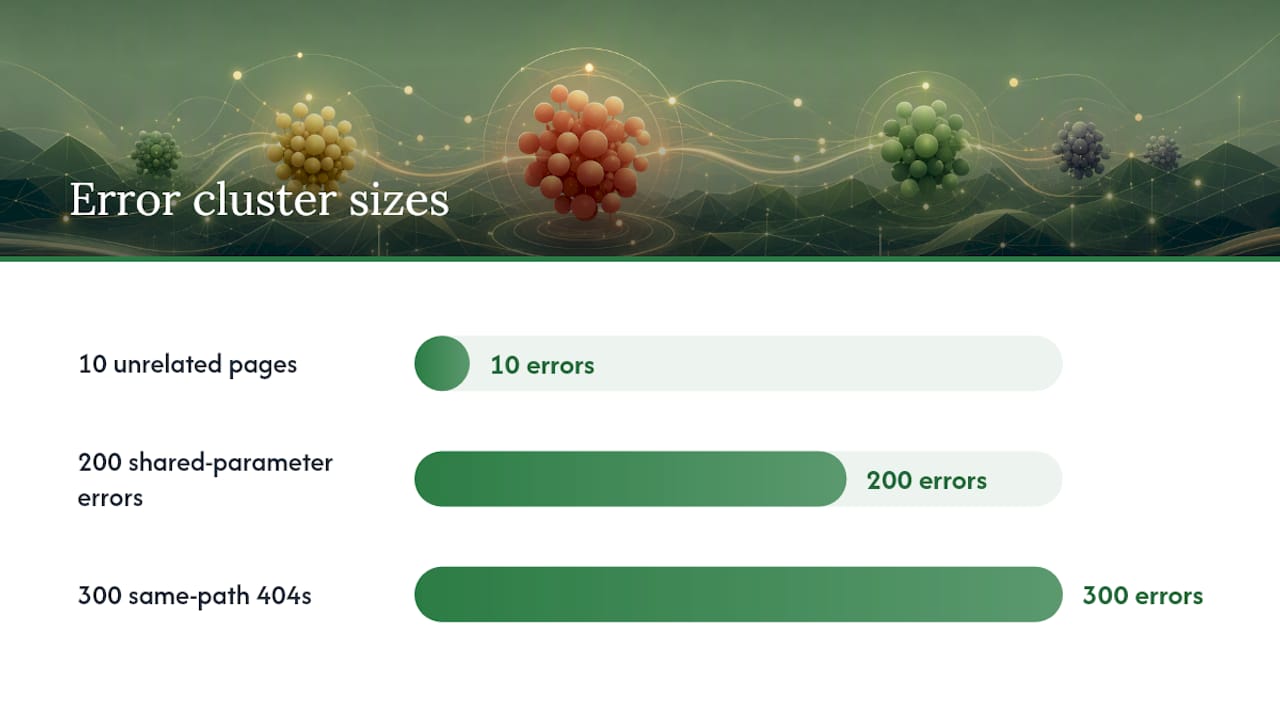
- Group the remaining issues by pattern. Look for shared directories, URL parameters, templates, or CMS plugins. Ten errors from ten unrelated pages point to ten separate problems. Two hundred errors all sharing
/products/?filter=point to one parameter-handling problem. - Apply the fix that matches the actual root cause. Unblock a wrongly disallowed path. Strip a stray
noindex. Merge or 301 duplicate pages into one canonical version. Rewrite thin content that Google correctly judged unworthy of indexing. Match the remedy to the diagnosis from step 2, not to a generic checklist. - Validate through Search Console, then confirm independently. Click "Validate Fix" on the affected issue, and separately run a Live Test through URL Inspection to see how the page renders right now, not the cached snapshot from Google's last crawl. Give the process time. Indexing can take anywhere from a couple of days to several weeks, so check back over roughly a 14 day window rather than resubmitting daily out of impatience.
Pro Tip: Requesting indexing before you've actually fixed the root cause is one of the most common wastes of time in this entire process. Google crawls the page, finds the same problem, and you're back where you started, except now you've burned a manual request slot that resets slowly. Fix first, request second, always.
The clusters you find in step 2 tell you more than any individual URL ever will. A single 404 is a broken link. Three hundred 404s from the same /blog/tag/ path is a taxonomy change someone made without setting up redirects. Treat the pattern as the diagnosis, not the symptom count.
Which Tools Actually Confirm the Fix Worked?
Four tools cover nearly every diagnostic question you'll face, and knowing which one answers which question saves a lot of wasted clicking.
- URL Inspection is your workhorse. The "indexed" view shows what Google last saw and stored; the "Live Test" shows what a fresh crawl would see right now. Use Live Test whenever you've just made a change, since the indexed snapshot can be days or weeks stale.
- Validate Fix is the formal signal to Google that you believe an issue is resolved. It kicks off a re-check on a schedule Google controls, not one you can accelerate by clicking it repeatedly.
- Server logs answer questions no Search Console tool can. Filtering logs for the Googlebot user agent shows you exactly when it visited, what status code your server returned, and whether 5xx errors cluster around a specific deployment window.
- The robots.txt tester and raw HTTP header inspection confirm whether a directive like
X-Robots-Tag: noindexis coming from your HTML, your server config, or a plugin you forgot was installed.
Pro Tip: If a client swears they never added a noindex tag, check the HTTP response headers directly, not just the page source. Plenty of CMS security plugins and staging-mode toggles inject X-Robots-Tag: noindex at the server level, invisible in the rendered HTML but very visible to Googlebot.
Google's own explanation of how Search discovers, crawls, and indexes content is worth reading once in full if you've never sat down with it. It reframes a lot of "why isn't this indexed" panic into a more accurate question: has this page even reached the front of the crawl queue yet?
How Do You Prevent Index Coverage Issues Before They Start?
Fixing the same category of error every quarter means the architecture, not the individual page, is the problem. A few structural habits keep the index focused on the pages that actually matter to your business.
- Keep your XML sitemap clean. List only canonical URLs you actually want indexed, and check the "All submitted pages" filter on a recurring basis rather than treating sitemap submission as a one-time task.
- Use internal linking deliberately. Pages that rank well and get crawled frequently can pass crawl priority to newer or more important pages simply by linking to them from relevant, visible spots in your content.
- Resolve canonical conflicts before they multiply. Parameterized URLs, filtered views, and tracking-tag variants can explode into thousands of near-duplicate addresses if you don't canonicalize or handle parameters at the source.
- Lock down CMS staging flags. A
noindextoggle meant for a dev environment that survives into production is one of the most common causes of a sudden, sitewide coverage collapse. Put these settings under version control where a change requires review. - Audit plugins that touch indexing signals. SEO plugins, caching layers, and security tools can all inject
X-Robots-Tagheaders or sitewide directives without an obvious changelog entry. - Practice crawl budget hygiene on larger sites. Prune low-value programmatic pages, thin tag archives, and near-duplicate listings so Googlebot spends its limited attention on the clusters that actually drive revenue.
None of this is glamorous work, but it's the difference between fixing the same "Discovered, currently not indexed" backlog every few months and never seeing it again.
What Does Index Coverage Recovery Look Like in Practice?
Technical audits and remediation like this are the core of what Honey Badger SEO's local SEO services handle for client sites, and the pattern repeats across very different industries.
One recurring case involves service-area businesses whose location and service pages get lost in "Discovered, currently not indexed" limbo after a site migration strips out internal linking between pages. The fix is rarely dramatic: rebuild the linking structure so authoritative pages point to the buried ones, clean up the sitemap, and let crawl priority do the rest. An insulation contractor case study shows this kind of technical cleanup translating into more estimate calls once the right pages were actually eligible to rank.
The distilled checklist from this kind of work: fix server and access errors first, separate crawled-but-rejected pages from undiscovered ones, match the fix to the actual root cause, and validate before moving on.
What Most Guides Get Backwards About Index Coverage
Most advice on this topic treats every non-indexed URL as a fire to put out, and that instinct is exactly backwards. The healthiest sites Anas has seen have plenty of "Excluded" URLs, and that's fine, because most of those exclusions are working exactly as designed.
The conventional wisdom that falls apart fastest is the idea that requesting indexing is a fix. It's a notification, not a remedy. If you haven't changed the actual root cause, that manual request just burns a limited resource and gets you the same rejection a week later.
What separates sites that recover quickly from those stuck in a loop is the discipline to diagnose before acting: pull the pattern, name the root cause, apply the specific fix that matches it, then validate and wait. Skipping straight to bulk resubmission or deletion without diagnosis wastes time. Server and access errors should be prioritized, as they can throttle downstream processes.
Get Hands-On Help Fixing Index Coverage Issues
Reading a Coverage report correctly is one skill. Having the time to triage error clusters, rebuild internal linking, fix redirect chains, and validate every change across a busy site is another problem entirely, especially when you're also running the business the site exists to support.
Specialized SEO providers often handle that work directly, without outsourcing any of it to a subcontractor the client won't talk to. A typical engagement often starts with a technical audit that maps every error and exclusion pattern back to its root cause, followed by prioritized fixes on the issues affecting important pages, then validation and monitoring to confirm the fix held. Clients usually receive reports on what changed and why, and retain ownership of their site, sitemap, and assets throughout the process. Pricing typically runs on a month-to-month basis without long-term lock-ins, fostering accountability to results rather than contractual obligations.
If your service pages, location pages, or blog content are stuck in "Discovered, currently not indexed" purgatory, or your server logs show Googlebot backing off after repeated errors, start with the Local SEO Services page to see what a technical audit and fix engagement covers for your site.
FAQ
How Do I Resolve an Indexing Issue?
Identify the exact status in the Page Indexing report, match it to its root cause (server error, block, noindex, canonical conflict, or content quality), apply the specific fix, then click Validate Fix and confirm with a Live Test in URL Inspection.
How Do I Fix Page Indexing Errors Specifically?
Errors almost always trace to server problems, robots.txt blocks, or broken redirects. Check server logs for 5xx timing, test the exact URL in the robots.txt tester, and trace any redirect chain to confirm it resolves in a single hop to the canonical page.
Why Is Google Not Indexing My Site?
The cause is usually one of a few things: a noindex tag or robots.txt block you didn't mean to apply, thin or duplicate content Google judged not worth a separate listing, or a discoverability gap where the page has no internal links pointing to it. Indexing can also simply take a few days to several weeks after a genuine fix, so check timing before assuming something is broken.
What's the Difference Between "Crawled" and "Discovered" Not Indexed?
"Crawled, currently not indexed" means Google read the page and chose not to index it, a quality or canonical issue. "Discovered, currently not indexed" means Google knows the URL exists but hasn't crawled it yet, usually a linking or crawl budget issue.
Can Honey Badger SEO Help Diagnose Index Coverage Problems?
Yes. Technical audits covering Coverage report triage, redirect and robots.txt fixes, and internal linking repairs are part of Honey Badger SEO's local SEO services, built for local service businesses that need their money pages actually indexed and ranking.