
Do not create a new profile. First, figure out whether you're looking at an account restriction or a profile suspension, because they need different fixes. If your Google Account is restricted, start the account-level appeal at My Accounts before touching anything else. If it's just the profile, spend the next hour saving the suspension email and pulling one proof photo plus one official document before you file anything.
TL;DR:
- Most suspensions are caused by name violations, address issues, duplicates, rapid bulk edits, or misleading content, with automated systems increasingly detecting these patterns.
- Identifying whether your profile is softly or publicly suspended requires checking email notices, search visibility, and login errors, as owners usually retain edit access during suspension.
- Effective reinstatement depends on gathering official documents, proof of address, and current photos, then attaching them to a clear, well-labeled evidence package within a tight time window.
- Appeals should only be filed after diagnosing and fixing the root cause, submitting specific explanations and evidence, and avoiding multiple requests while the first is pending.
- Prevent future suspensions by staggering edits, maintaining consistent business information, documenting ownership changes, and regularly auditing your NAP data across online profiles.
Table of Contents
- What Does It Mean When Your Google Business Profile Is Suspended?
- What Actually Triggers a Google Business Profile Suspension?
- How Do You Diagnose Why Your Profile Was Suspended?
- What Documents and Photos Do You Need to Reinstate Your Profile?
- How Do You Appeal a Suspended Google Business Profile?
- How Do You Prevent Your Business Profile From Being Suspended Again?
- How Honey Badger SEO Approaches Profile Recovery
- A Final Word on Getting Your Profile Back
- Get Your Profile Back Without the Guesswork
- Sources
What Does It Mean When Your Google Business Profile Is Suspended?
A suspended Google Business Profile falls into one of three buckets, and mixing them up is the single fastest way to waste an appeal. Knowing which one you're dealing with tells you exactly where to click first.
Soft suspension. Google strips your management access, but the listing itself might still show up in Maps or Search. You'll notice this because you can no longer log in to edit hours, respond to reviews, or post updates, yet customers can still find you. It's the less severe version, and it usually resolves faster once you correct the underlying issue.
Hard suspension. The listing disappears entirely. No map pin, no knowledge panel, no search presence. Customers searching your exact business name find nothing, which is a much bigger problem for phone calls and walk-ins than a soft suspension ever is.
Account restriction. This one is different because it isn't about your listing at all. It's about your Google Account itself getting flagged, and when that happens, every Business Profile tied to that account gets suspended along with it. Google is explicit that a restricted Google Account will have its associated profiles suspended, and any content you try to add while restricted gets automatically rejected. You cannot fix a profile suspension caused by an account restriction by appealing the profile. You have to clear the account restriction first.
Here's how to tell which one you're facing:
- Check your email for the exact suspension notice. Google's wording usually tells you whether it's account level or profile level.
- Search your business name plus city in Google Maps. If the listing is gone entirely, that's a hard suspension. If it's visible but you can't edit anything, that's soft.
- Log in to your Business Profile dashboard. A banner or error message at the top usually names the restriction type.
- Try adding a photo or edit. If it's rejected instantly, your account itself may be the problem, not the listing.
One detail that surprises a lot of owners: even while suspended, owners and managers typically retain edit access for appeal purposes. The public can't see the listing, but you're not locked out of your own dashboard the way you might assume.
What Actually Triggers a Google Business Profile Suspension?
Most suspensions trace back to a handful of repeat offenders. Work through this list in order, because the first three cause the majority of cases we see.
Business name violations. Stuffing keywords into your name field, like "Smith Plumbing Best 24/7 Emergency Repair Phoenix," is the number one trigger. Google's guidelines require your name to match your real-world signage and legal branding exactly. Fix the name field back to what's on your storefront and door before doing anything else.
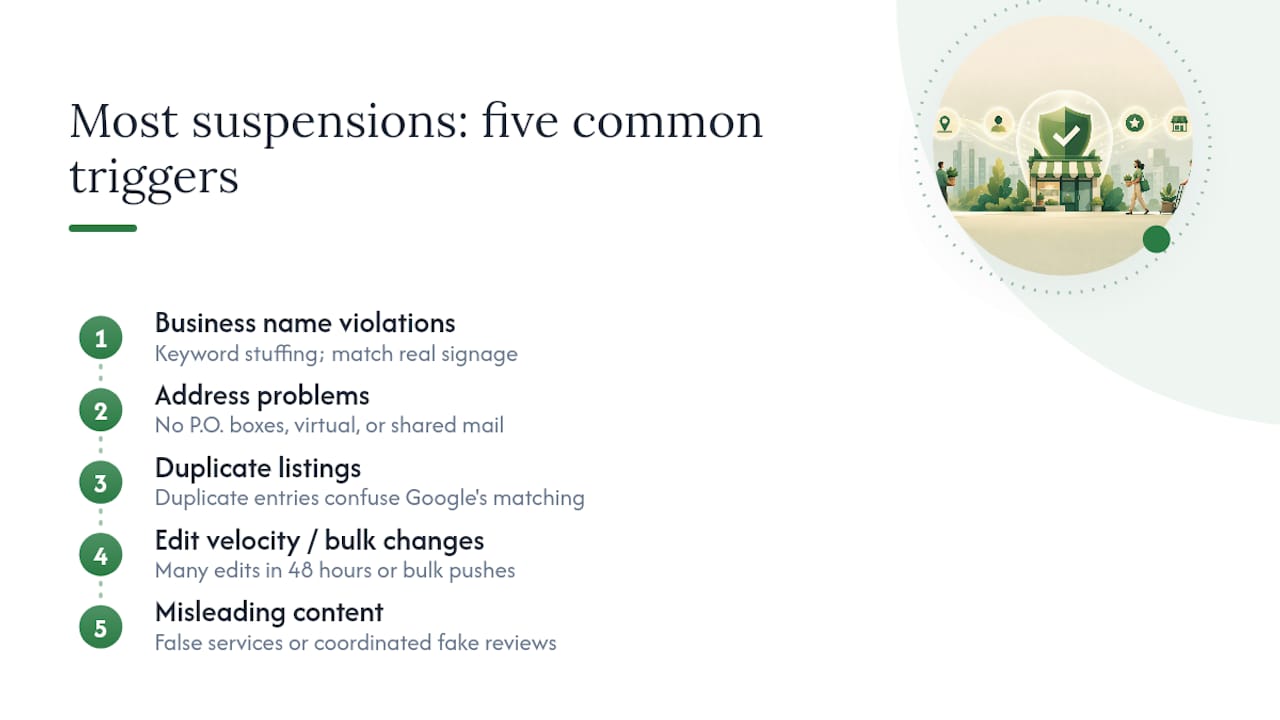
Address problems. P.O. boxes, virtual offices, coworking spaces, and shared mailboxes all violate the address policy for a physical storefront listing. If you're a service-area business that doesn't see customers at a fixed location, you need to mark yourself correctly as a service-area business and hide the street address rather than list a fake or borrowed one.
Duplicate listings. A second listing for the same business, often created by a well-meaning employee, a previous marketing vendor, or an auto-generated entry Google pulled from a data aggregator, is a common trigger. Duplicates confuse Google's matching systems and frequently cascade into a suspension of both listings, not just the newer one.
Edit velocity and bulk changes. Changing your name, address, category, and phone number all within the same 48 hours reads as suspicious to Google's automated review, even when every change is legitimate. So does having a third-party marketing agency push a batch of edits across dozens of client listings at once.
Misleading content. Listing services you don't actually offer, using a category that doesn't match your business, or accumulating a cluster of reviews that look purchased or coordinated will all draw scrutiny.
By 2026, most of this scrutiny is automated rather than driven by a human reviewer receiving a complaint. Google's detection increasingly runs on pattern recognition across name changes, address clustering, and review timing, which means a change that looks fine in isolation can still trip a flag if it matches a pattern the system has learned to distrust.
Pro Tip: If you've had a marketing vendor manage your profile in the past, check the account's edit history for changes you didn't authorize. Vendor errors and abandoned auto-generated listings are a surprisingly common, invisible cause of suspension.
How Do You Diagnose Why Your Profile Was Suspended?
Run this checklist in order. Each step either confirms or eliminates a specific cause, and skipping ahead to the appeal without doing this work is the most common reason reinstatement requests get denied.
- Save the exact suspension message. Copy the full wording from the email and the dashboard, including timestamps. Google's phrasing often hints at which policy triggered the action.
- Check your account restriction status at Google's account restrictions page, then check your listing status directly through Business. These are two separate systems, and you need to confirm both.
- Review your recent edit history. Look for spikes in changes or rejected suggestions around the time the suspension hit. A cluster of edits right before the suspension is usually your answer.
- Search your exact business name and address in Maps and standard Search. This tells you whether you're dealing with a hard or soft suspension, and whether a duplicate listing is competing with yours.
- Audit your NAP consistency. Pull up your website footer, your Facebook page, and any directory listings like Yelp. Mismatched name, address, or phone details across these sources are a frequent, overlooked contributor.
Treat this as troubleshooting, not paperwork. Filing a reinstatement request before you've actually identified and corrected the cause is the most common mistake owners make, and it's a big part of why first appeals get denied.
What Documents and Photos Do You Need to Reinstate Your Profile?
Google's reviewers are looking for proof your business is real, operates at the address you claim, and matches what your listing says. Build your evidence package around that goal, not around volume.
Official documents carry the most weight. A business license, articles of organization, or a state tax registration certificate tops the list. These are government-issued, hard to fake, and exactly what a reviewer wants to see first.
Proof of address comes next: a recent utility bill, a signed lease, or a bank statement showing your business name and address. Black out account numbers and any personal financial details before you upload anything.
Photos of your physical presence matter more than most owners expect. Get an exterior shot showing permanent signage with your business name visible, an interior shot showing staff or equipment in use, and if you run a service-area business, a photo of your branded vehicle. Timestamp them if your phone allows it.

Website and email proof rounds out the package. A website page displaying your address, staff bios, or service details helps, and an email address on your own business domain, rather than a generic free provider, adds credibility for the primary owner contact.
Service-area businesses without a public-facing storefront should lean on service logs, permits, redacted client invoices, and vehicle photos instead of a building shot.
Compile everything into a single PDF with clear filenames, and remember that Google's appeals tool has a strict time window for attaching evidence, typically around 60 minutes once you start the upload. Have your file ready before you start the form, not while you're filling it out.
Pro Tip: Name your evidence file something a reviewer can parse instantly, like "BusinessLicense_SmithPlumbing_2026.pdf" rather than "IMG_4821.pdf." It sounds trivial, but a clearly labeled document set signals organization and legitimacy before anyone even reads it.
How Do You Appeal a Suspended Google Business Profile?
File the appeal only after you've fixed the root cause, or immediately if the issue is an account restriction, since that clock needs to start moving regardless of what else you're preparing.
- Sign in to the correct Google Account. Confirm it's the one that owns or manages the profile, not a personal account you rarely use.
- Open Google's appeals tool through the official reinstatement guidance, which walks you to the correct form for your situation.
- Select the specific profile and the exact decision you're appealing. Being precise here matters more than being thorough.
- Write a concise explanation. State what caused the issue and what you fixed. Two or three tight sentences beat a long defensive essay every time.
- Attach your evidence package within the tool's active window and submit.
- Save your confirmation and any appeal ID number immediately after submitting.
A few things worth knowing before you hit send:
- If Google denies the first appeal, you can typically request an additional review by submitting new evidence that wasn't part of the original request, not the same documents again.
- Response times vary, but most owners hear back within a few business days to a couple of weeks, depending on the complexity of the case and current review volume.
- Do not submit a second or third appeal while the first is still pending. Stacking requests confuses the review queue and rarely speeds anything up.
- If Google requests clarification, respond directly and promptly through the same channel rather than opening a new appeal.
- Escalation options exist through Google's Business Profile support contact forms and the public help community if you've been denied twice with strong evidence.
Above everything else, resist the urge to build a second listing out of frustration. Google's own guidance is direct on this point: recreating a profile while the original is suspended tends to make recovery harder, not easier, and can trigger additional scrutiny across both listings.
How Do You Prevent Your Business Profile From Being Suspended Again?
Reinstatement isn't the finish line. Most repeat suspensions happen because owners go right back to the habits that caused the first one.
- Stagger your edits. Change one field, wait a few days, then change the next. Never touch your name, address, and category in the same session.
- Keep an edit log. A simple spreadsheet noting what changed and when gives you a paper trail if something gets flagged later.
- Tighten ownership. Set your primary owner email to a business-domain address and keep at least one verified backup owner in case the primary account has trouble.
- Run a quarterly NAP audit. Confirm your name, address, and phone number match exactly across your website, directories, and social profiles.
- Set up call and form tracking so you notice a traffic drop within days, not months, if something goes wrong again.
Pro Tip: Document every ownership transfer in writing, even informally, between yourself and any manager or agency. A clean paper trail is exactly what you'll need if Google ever questions who legitimately controls the profile.
If you're managing multiple locations or don't have the bandwidth to run these checks yourself, a commercial gardening and landscaping maintenance service in London can absorb the ongoing monitoring so a small mistake doesn't turn into another suspension.
How Honey Badger SEO Approaches Profile Recovery
Every recovery case we handle follows the same order: audit first, fix the cause, build the evidence package, submit the appeal, then monitor. We check account restrictions before anything else, because chasing a profile-level appeal while the account itself is flagged wastes days. Signage photos and name-and-address consistency come next, since those are the documents reviewers weigh most heavily. Timelines vary by case complexity, but owners who arrive with a clean, correctly ordered evidence package typically move through the process faster than those who file first and gather proof after a denial.
A Final Word on Getting Your Profile Back
The pattern we see over and over is owners rushing the appeal before doing the diagnostic work, then wondering why Google denied it. Slow down, confirm whether you're dealing with an account issue or a profile issue, gather documents that actually prove your business is real, and write an explanation that's short and specific. Do not build a second listing out of frustration, no matter how tempting that shortcut looks at hour three of a bad day. If you've been denied twice with genuinely strong evidence, that's the point to bring in someone who handles this professionally rather than guessing at what a third appeal needs.
— Anas
Get Your Profile Back Without the Guesswork
We handle the entire recovery process directly without outsourcing or using template appeals. We run the diagnostic, build the evidence package, submit the appeal, and stay on the account through reinstatement.
The service includes a diagnostic audit, evidence packaging, appeal submission, ownership management, and ongoing profile monitoring after reinstatement. Our Google Business Profile Optimization service covers exactly this, priced month to month with no long-term commitment. If you're in Arizona, our Arizona SEO team can also fold recovery into a broader local visibility plan. Reach out through Seohoneybadger to get your specific case reviewed and find out how fast reinstatement realistically looks for you.