
Claim and verify your Google Business Profile, fill out every core field accurately, add photos, and start collecting reviews this week. Then treat the profile like a living asset instead of a one-time setup: schedule a recurring monthly check to refresh photos, respond to reviews, and post updates. That single habit separates listings that show up in the local pack from listings that quietly fade.
TL;DR:
- Ensuring your Google Business Profile is verified and complete dramatically improves its visibility in local search results.
- Matching your NAP details and selecting the correct primary and secondary categories are critical for relevance and ranking success.
- Regularly updating high-quality photos, posting weekly content, and collecting consistent reviews sustain engagement and local prominence.
- Monitoring insights monthly helps identify issues like drops in views or calls caused by duplicated listings or recent profile edits.
- Outsourcing GBP management to local experts can streamline ongoing maintenance and significantly boost local search performance.
Table of Contents
- How Do You Claim and Verify a Google Business Profile?
- What Profile Fields Actually Move the Needle?
- Which Photos and Posts Actually Get Clicks?
- How Do You Get More Google Reviews, the Right Way?
- Should You Use Products, Services, or Booking Links?
- What Actually Controls Your Local Ranking?
- What GBP Metrics Should You Check Every Month?
- What Mistakes Quietly Sabotage a GBP Listing?
- Honey Badger SEO's Ground-Level Take on GBP Work
- Get Your Google Business Profile Managed by Local Specialists
- Sources
How Do You Claim and Verify a Google Business Profile?
Verification tells Google you actually run the business you're listing, and an unverified profile rarely shows up in map results at all. Google's own guidance ties visibility directly to having a complete, verified listing, since verified and complete profiles are more likely to appear in relevant local searches. Skip this step and everything else you build on top of it is wasted effort.
Here's the order to follow:
- Search for your business name on Google Maps or Search and click "Own this business?" If nothing exists, create a new profile from business.google.com.
- Choose a verification method. Google typically offers a postcard mailed to your address (5 to 14 days), a phone call or text with an automated code, an email verification for some accounts, or instant verification if you already own a verified site through Search Console.
- Enter the code exactly as received. Postcard codes expire, so verify within the window Google gives you or request a replacement.
- Confirm your listing appears correctly on Search and Maps within 24 to 48 hours after verification clears.
Ownership changes trigger re-verification almost every time, especially if you change the business name, address, or category during a transfer. If verification fails or gets flagged as suspicious, Google will usually ask for supporting documents: a business license, utility bill, or lease agreement tied to the listed address. Keep those on hand before you start, because appeals move faster with evidence attached than with a follow-up plea for help.
What Profile Fields Actually Move the Needle?
Your Name, Address, and Phone number (NAP) need to match, word for word, digit for digit, across your website, your profile, and every directory that lists you. Inconsistent formatting, like listing "St." on your website and "Street" on your profile, confuses Google's matching systems and can quietly suppress your ranking.
A few formatting habits keep things clean:
- Write your phone number the same way everywhere: (555) 123 4567 or 555.123.4567, whichever you pick, forever.
- Use your legal or commonly known trade name only. Do not append keywords like "Best Plumber Phoenix" to your business name field. Google removes or suspends listings for this.
- Match your street address format exactly to what's on your business license or lease.
- List operating hours precisely, including special hours for holidays. Nothing frustrates a searcher more than driving to a "closed" business Google said was open.
Category selection carries more weight than most owners realize. Your primary category should describe what you are, not everything you do. A general dentist should choose "Dentist," not "Cosmetic Dentist," even if cosmetic work is a big part of the practice. Secondary categories cover the extras: teeth whitening, orthodontics, emergency dental care. Pick too broad a primary category and you dilute relevance; pick too narrow and you miss searches you'd otherwise win.
Your business description deserves real thought. Google gives you up to 750 characters, but only the first 250 or so show without a click, and a 2025 analysis found that top-ranking listings tended to run around 70 words in their descriptions, noticeably longer than lower-ranked competitors. Write naturally, mention your city and core services once each, and skip the temptation to repeat keywords like you're filling out a form.
Pro Tip: Write your description like you're explaining the business to a new neighbor, not a search algorithm. Google can tell the difference, and so can customers.
Attributes round things out: women-owned, veteran-owned, wheelchair accessible, outdoor seating, accepted payment types. Fill in every attribute that applies. If you serve a radius instead of a storefront, set your service area precisely instead of leaving it default, since an oversized service area can actually hurt your relevance for nearby searches.
Which Photos and Posts Actually Get Clicks?
Listings with fresh, high-quality photos get more calls and visits, largely because photos build the trust a phone number alone can't. Regularly updated photos and short videos increase engagement, which is exactly the signal you want Google and customers to see.
Prioritize these shots, in this order:
- Exterior and storefront sign, so people recognize your building on approach.
- Interior shots showing cleanliness, layout, and atmosphere.
- Your team at work, which builds trust faster than almost anything else.
- Best-selling products or signature services, shot in natural light.
- Before-and-after pairs if you're in a service business where transformation sells (contractors, med spas, salons).
Upload images at least 720 by 720 pixels, in JPG or PNG format, and keep the file size reasonable so they load fast. A simple caption naming the location or service helps both users and Google's image indexing.
Video doesn't need production value. A 15 to 30 second phone-shot store walkthrough or a quick product demo outperforms a slick commercial, because it feels authentic.
Google Posts function like mini ads inside your listing: updates, offers, and events. Semrush recommends publishing regularly rather than in occasional bursts. Aim for once a week if you can sustain it, twice a month at minimum. Keep copy short, lead with the benefit, and always include a clear action, like "Call now" or "Book today."
How Do You Get More Google Reviews, the Right Way?
Review count matters, but review velocity, meaning how many recent reviews you're earning each month, matters just as much. A Semrush analysis found that consistent monthly review acquisition outperforms a single burst of old reviews, because Google and customers both read recency as a signal of an active, trustworthy business.
Build the ask into your process:
- Ask at the moment of highest satisfaction, right after a job finishes or a purchase is made, not three weeks later in a generic email blast.
- Send a follow-up text or email within 24 hours with a direct link to your review form. Every extra click costs you responses.
- Print your review link as a QR code on receipts, invoices, or a small counter sign.
- Respond to every review within 48 hours, positive or negative.
For positive reviews, thank the customer by name and mention the specific service. For neutral or mixed reviews, acknowledge the concern and offer to make it right. For negative reviews, stay calm, apologize for the experience without admitting fault you don't owe, and move the conversation offline: "Please call our office directly so we can resolve this."
Pro Tip: Never offer discounts, gift cards, or freebies in exchange for a review. Google's policies prohibit incentivized reviews, and getting caught can mean losing your review section entirely.
Should You Use Products, Services, or Booking Links?
Services listings work as a menu, letting you describe offerings with pricing when you don't sell discrete physical items, which fits most local service businesses, from HVAC repair to dental cleanings. Products listings work better for retail, showing individual items with photos and prices, though Google notes that in-store product features aren't available in every country or business category, so check availability before building your strategy around them.
A few setup priorities:
- Add a booking or appointment link if your industry has a supported scheduling provider integrated with Google. Salons, medical offices, and fitness studios usually have direct support.
- If no native integration exists, link your own booking page directly through the website field or a custom action button.
- Use call tracking or UTM parameters on your booking and website links so you can see which conversions actually originated from your profile.
- Update seasonal or discontinued services promptly. A dead link on an action button costs you the click and the trust.
What Actually Controls Your Local Ranking?
Three factors decide where you show up: relevance, distance, and prominence. Google states plainly that local rankings are based primarily on these three signals, and understanding which tactic feeds which factor keeps you from wasting effort on the wrong fix.
- Relevance measures how well your profile matches what someone searched. Categories, your description, and services listings all feed this. Fix relevance and you can see movement within days to a couple of weeks.
- Distance measures how close your listed address or service area is to the searcher. You can't move your building, but you can correct an inflated service area or a wrong pin placement, both of which take effect almost immediately once corrected.
- Prominence measures your overall reputation and web presence, driven heavily by review volume, review velocity, and backlinks or citations pointing to your business. This one moves slowest, often taking two to four months of consistent review acquisition and citation building before you see a real shift.
Google also cautions that you cannot pay to improve your local ranking, and it keeps the exact algorithm weighting confidential. That's worth remembering any time a service promises guaranteed placement. Focus on the controls you actually have.
What GBP Metrics Should You Check Every Month?
Your Insights panel tracks search views, map views, website clicks, direction requests, and phone calls, and reviewing these monthly tells you whether your optimization work is translating into actual customer action rather than just impressions.
Run this checklist every month:
- Request reviews from your last 10 to 20 completed jobs or transactions.
- Reply to every new review, positive or negative, within 48 hours.
- Publish at least one new Google Post.
- Upload two to four fresh photos, prioritizing recent work or seasonal shots.
- Check that hours, phone number, and attributes are still accurate, especially around holidays.
- Review your Questions & Answers section and answer anything unaddressed.
| Metric | What it tells you | Watch for |
|---|---|---|
| Search views | How often your profile appeared in results | A steady decline suggests a relevance or category issue |
| Map views | Visibility on Google Maps specifically | Drops often follow a pin or service-area change |
| Website clicks | Interest converting to further research | Low clicks despite high views may mean a weak description |
| Direction requests | Local intent to visit in person | Sudden drop can flag a wrong address or duplicate listing |
| Calls | Direct conversion from your profile | Compare against call tracking to confirm accuracy |
A sudden drop in any metric usually traces back to one of three causes: a suspended or duplicate listing, a recent edit that broke something (wrong hours, wrong category), or a batch of negative reviews. Check your listing status first, then your recent edit history.
What Mistakes Quietly Sabotage a GBP Listing?
Duplicate listings are the most common silent killer. If your business shows up twice under slightly different names or addresses, Google splits your reviews and authority between them. Search your business name in incognito mode and request merges or removals for duplicates through Google's support tools.
Keyword-stuffed business names ("Joe's Plumbing Emergency 24/7 Phoenix") get flagged and can trigger a suspension, sometimes with little warning. Fake or incentivized reviews carry the same risk and can wipe out your entire review history overnight.
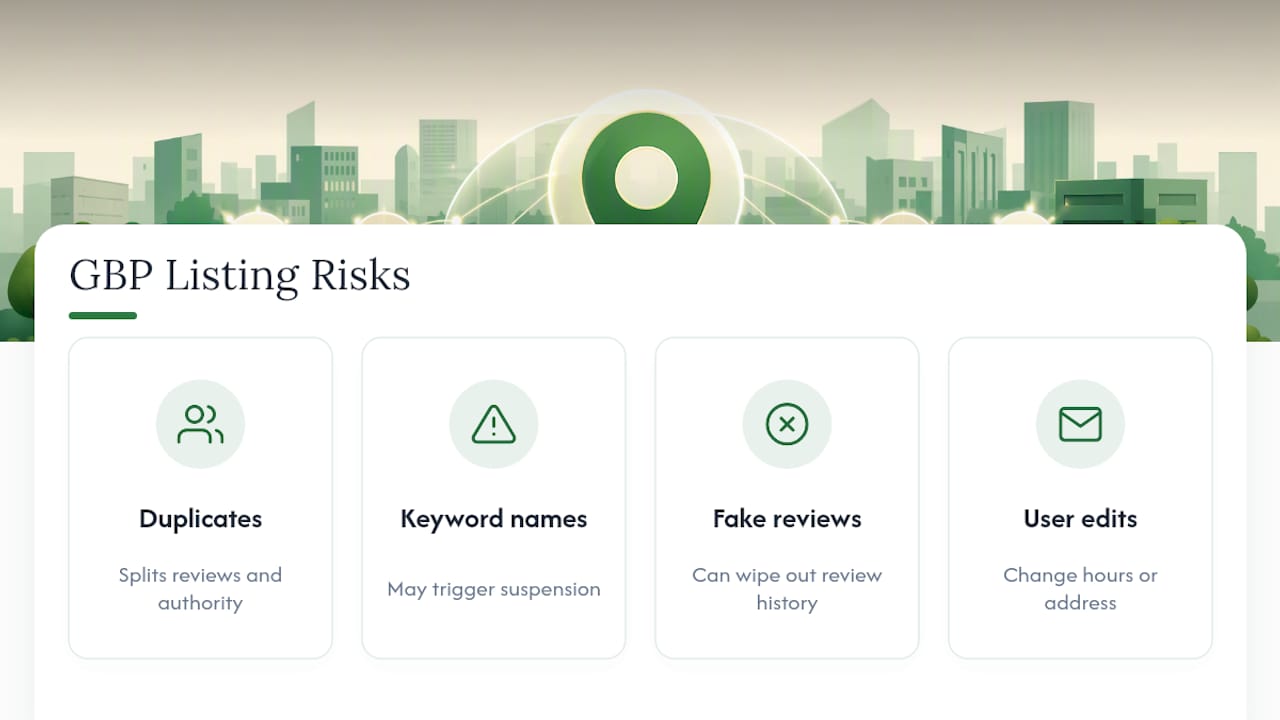
Watch for user-submitted edits, too. Anyone can suggest a change to your hours or address, and Google sometimes auto-approves small edits. Check your profile weekly for unauthorized changes, and if you get suspended over a category or name dispute, use Google's reinstatement request form with documentation ready: business license, tax ID, and proof of address.
Honey Badger SEO's Ground-Level Take on GBP Work
Most advice about Google Business Profile optimization treats it like a checklist you complete once. That's the biggest misread of the whole system. A profile is closer to a storefront window: dust it, restock it, and update the signage, or it starts looking abandoned even if the business inside is thriving.
GBP work centers on that maintenance rhythm: verification and setup first, then a monthly cycle of posting, photo refreshes, and review response that never stops. The goal isn't a higher star rating for its own sake. It's more calls and more direction requests, tracked and reported plainly.
Handling this yourself makes sense if you have an hour a month and the discipline to actually spend it. It stops making sense once you're managing multiple locations, juggling category or suspension issues, or watching a competitor consistently outrank you despite doing "everything right." At that point, the hands-on GBP management becomes worth the trade for your time.
— Anas
Get Your Google Business Profile Managed by Local Specialists
Seohoneybadger is the alternative to letting your profile drift on autopilot between the rare moments you remember it exists. Instead of a checklist you're supposed to run monthly and never quite do, you get someone handling verification, photo refreshes, review responses, and post publishing on a real schedule, with results tracked back to actual calls and direction requests.
The Google Business Profile Optimization service covers full setup and verification, ongoing description and category refinement, a structured review acquisition and response process, and monthly reporting so you can see exactly what's moving. A quick audit shows you where your current listing is losing visibility, whether that's a category mismatch, thin reviews, or stale photos, before you commit to anything.
Pricing runs month to month with no long-term lock-in, so you keep the option to walk away if the work doesn't earn its keep. If you run a business in the Phoenix area specifically, the Scottsdale SEO team can start with a direct profile review this week. Reach out and get a straight answer on what's holding your listing back.
Sources
- Tips to improve your local ranking on Google
- Google Business Profile Optimization: Improve Local Ranking (2026) - Shopify
- 7 Google Business Profile Optimization Tips to Drive Visibility
- 13 Google My Business Optimizations to Rank Higher in Local Search