Google Business Messages gives brands a rich, API-driven chat channel inside Search, Maps, and Ads, while RCS delivers similar branded features through the default Android messaging app. Both beat plain SMS for conversion, but Business Messages demands real developer work: partner registration, webhooks, OAuth. If you just need customers to reach you, a WhatsApp or SMS link in your Business Profile gets there in minutes.
TL;DR:
- Using simple WhatsApp or SMS links offers an instant, low-cost way to enable customer contact without engineering, especially for small-scale businesses.
- Full API-based Business Messages are justified only for high-volume, complex inquiries that require automation, structured flows, and tracking.
- Google mandates de-duplication logic, retry handling, and realistic staffing plans, making implementation more technical and resource-intensive.
- The August 2024 removal of Google’s built-in chat from Business Profiles shifts focus toward automation and structured conversations to maintain engagement.
- Starting with lightweight solutions and measuring volume before building full integrations avoids unnecessary delays and costs in messaging programs.
Table of Contents
- What Google Business Messaging and RCS Actually Are
- How Messages Actually Move Behind the Scenes
- Features That Actually Move the Needle
- Getting an Agent Live: Registration and Setup
- The GBP Chat Retirement Changed the Default Path
- Where Messaging Actually Pays Off
- Rules That Keep Messaging Programs Out of Trouble
- When It's Worth Building vs. When It's Not
- Why the Build Decision Matters More Than the Feature List
- Getting Help With Google Business Profile and Local Messaging Strategy
- Sources
What Google Business Messaging and RCS Actually Are
Business Messages is Google's asynchronous messaging platform that lets customers start a conversation with your business straight from Search, Maps, or an ad. It's brand-controlled: you register an agent, connect it to your systems, and every conversation flows through Google's infrastructure rather than a generic phone number.
RCS for Business is a different animal. It rides on the default messaging app already installed on most Android phones, replacing plain SMS with branded, interactive messages that include media, buttons, and suggested actions. Coverage is uneven, though. iOS support and carrier rollout still lag behind Android, so an RCS pilot performs best against an Android-heavy customer base.
If your goal is simply "let people text us," don't overbuild. Adding a WhatsApp or SMS link to your Business Profile does that with zero engineering. Reach for the full API only when you need automated flows, location routing, or a branded experience tied to your search presence.
How Messages Actually Move Behind the Scenes
Every Business Messages conversation runs through an "agent," a configured entity tied to your business that receives and sends messages via webhooks and the Business Messages API. When a customer texts you from a Search result or a Maps listing, Google posts a JSON payload to your webhook URL. Your system parses it, decides how to respond, then replies through the API.
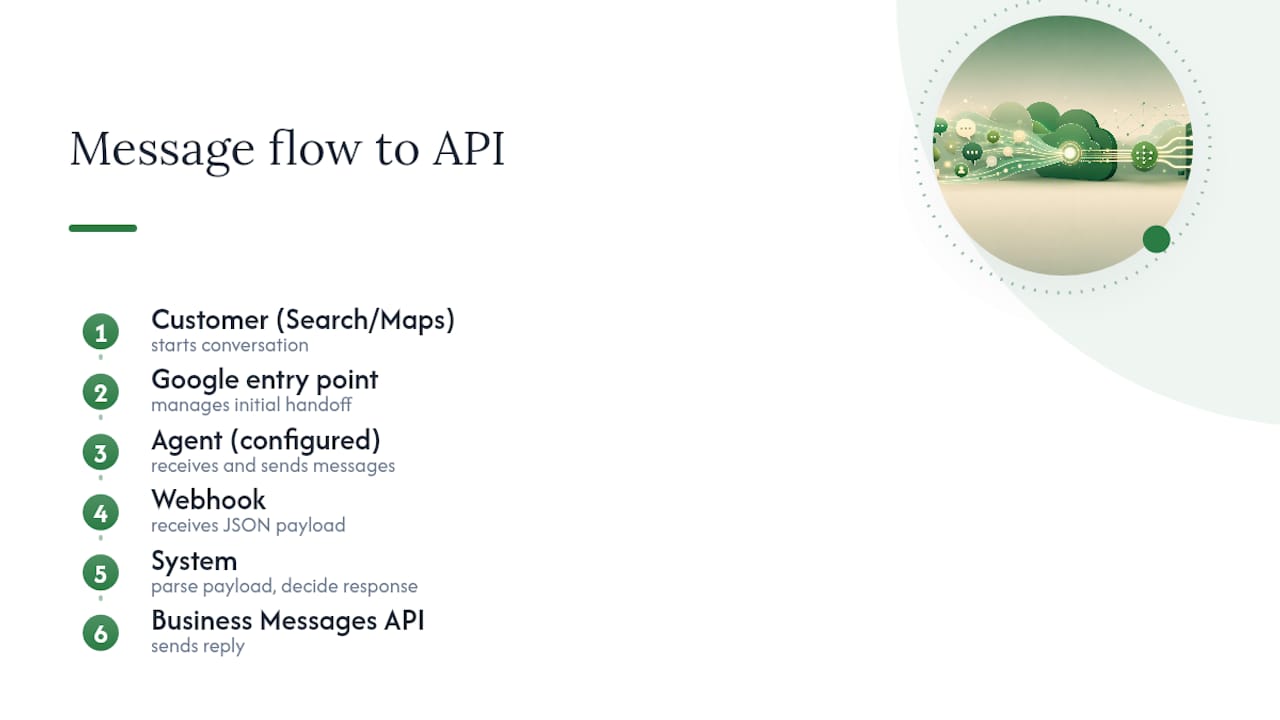
Conversations don't last forever. A thread can continue for a limited period before it closes, so any workflow built around it needs a plan for what happens after that window, whether that's re-engagement or simply letting the thread lapse.
One detail catches teams off guard: Business Messages uses an "at-least-once" delivery model, meaning the same message can arrive at your webhook more than once. Without de-duplication logic keyed on the message ID, you'll end up processing a customer's order twice. Pair that with retries using exponential backoff so a temporary outage doesn't cause a flood of duplicate replies once your service comes back.
Authentication runs on OAuth and a service account key issued during registration. And for entry points Google manages directly (as opposed to your own app), Google requires a human representative available to step in when the bot can't resolve a request.
Features That Actually Move the Needle
The reason Business Messages beats a basic contact form is the feature set. Rich cards and carousels let a customer scroll through service options or products without leaving the chat. Suggested replies and suggested actions turn a vague inquiry into a guided flow: "Book an appointment," "Call now," "Get a quote."
A few capabilities worth building around:
- Delivery and read receipts, so you know a message actually reached the customer before you follow up.
- Built-in CSAT surveys that fire automatically at the end of a conversation, instead of you bolting on a separate feedback tool.
- Image and PDF attachments for quotes, before/after photos, or service menus.
- Location-aware responses tied to a specific Place ID, useful for multi-location businesses answering "do you have this in stock at my nearest store?"
Businesses that lean into suggested actions typically see faster triage, since a customer tapping "Schedule a visit" skips three or four back-and-forth messages that a plain text thread would require.
Getting an Agent Live: Registration and Setup
Getting from zero to a working agent follows a fixed sequence, and skipping a step usually means a rejected submission.
- Apply for a partner account and get approved to build Business Messages agents.
- Create your agent profile, including business information and supported locales.
- Generate a service account key for authentication and store it securely outside your codebase.
- Enable the required Business Messages APIs in your Google Cloud project.
- Set your webhook URL so Google knows where to send incoming messages.
- Build de-duplication logic keyed on messageId, plus retry handling with exponential backoff for failed sends.
- Configure OAuth flows if you need to personalize responses using signed-in customer data.
- Run test conversations across every entry point (Search, Maps, ads) before requesting production access.
Pro Tip: Test your webhook's response to a deliberately duplicated payload before launch. If your system processes it twice, fix the de-duplication logic now, not after a customer gets billed twice for the same order.
Google also expects your agent to show realistic availability windows and to route to a live person when automation stalls, a requirement worth building into your staffing plan, not just your code.
The GBP Chat Retirement Changed the Default Path
As of July 31, 2024, Google retired the built-in chat feature from Business Profiles. Businesses that relied on that free, no-setup chat button lost it, along with call history tracking. Old conversations remain downloadable through Google Takeout, but only for a limited window.
The practical fallback is adding a WhatsApp or SMS contact link to your Business Profile, which takes a few minutes and requires no development. The long-term path, if you need automation and rich features, is registering for Business Messages. One is instant and limited; the other takes engineering time and pays off with structured, trackable conversations.
Where Messaging Actually Pays Off
The businesses getting real value from this aren't running generic customer service. They're solving a specific bottleneck: appointment booking, support triage, order status, or lead qualification before a human ever picks up the phone.
Before greenlighting a build, run a short pilot with a clear scope:
- Define one measurable goal (more bookings, faster response times, fewer missed leads).
- Decide whether to build with an in-house developer or bring in a partner agency.
- Map out the suggested-reply flow and where the CSAT survey fires.
- Assign staffing for the human handoff, even if it's one person checking a dashboard twice a day.
- Track messages per lead, chat-to-booking conversion, and your CSAT score against a target, not just a vague sense of "it's working."
Ninety days is enough time to know if the channel earns its keep. If conversion and CSAT numbers hold up, expand it. If they don't, you've lost a quarter, not a year.
Rules That Keep Messaging Programs Out of Trouble
Never ask for sensitive personal information, payment details, health data, government IDs, inside a chat thread. If a flow requires verified identity, use OAuth to authenticate the customer instead of collecting it as freeform text.
Design the handoff from bot to human deliberately. Tell the customer how long they'll wait, and don't leave them guessing whether anyone is coming. Use the built-in CSAT survey rather than layering on a separate feedback request. It's designed to fire at the natural end of a conversation and won't feel like a second ask.
Respect locale and language settings. A customer who set their phone to Spanish shouldn't get an English-only bot response. And remember that Google scans messages for spam protection, so you can't apply your own encryption keys on top of the platform's.
When It's Worth Building vs. When It's Not
An in-house Business Messages build makes sense once you're handling enough conversation volume that automation pays for the engineering time, usually multi-location businesses or anyone running paid ads at scale. For a single-location dental practice or a two-truck insulation crew, WhatsApp or SMS links inside a well-optimized Google Business Profile usually solve the same problem faster.
At Seohoneybadger, we treat messaging as one lever inside a broader local SEO strategy, not a standalone project. More visibility in Search and Maps means more people reaching your message thread in the first place.
Why the Build Decision Matters More Than the Feature List
Most guides on this topic treat Business Messages and RCS as a feature comparison: cards versus carousels, receipts versus none. That misses the real decision point. The question isn't which platform has more bells and whistles. It's whether your business has the conversation volume and staffing to justify an API integration at all.
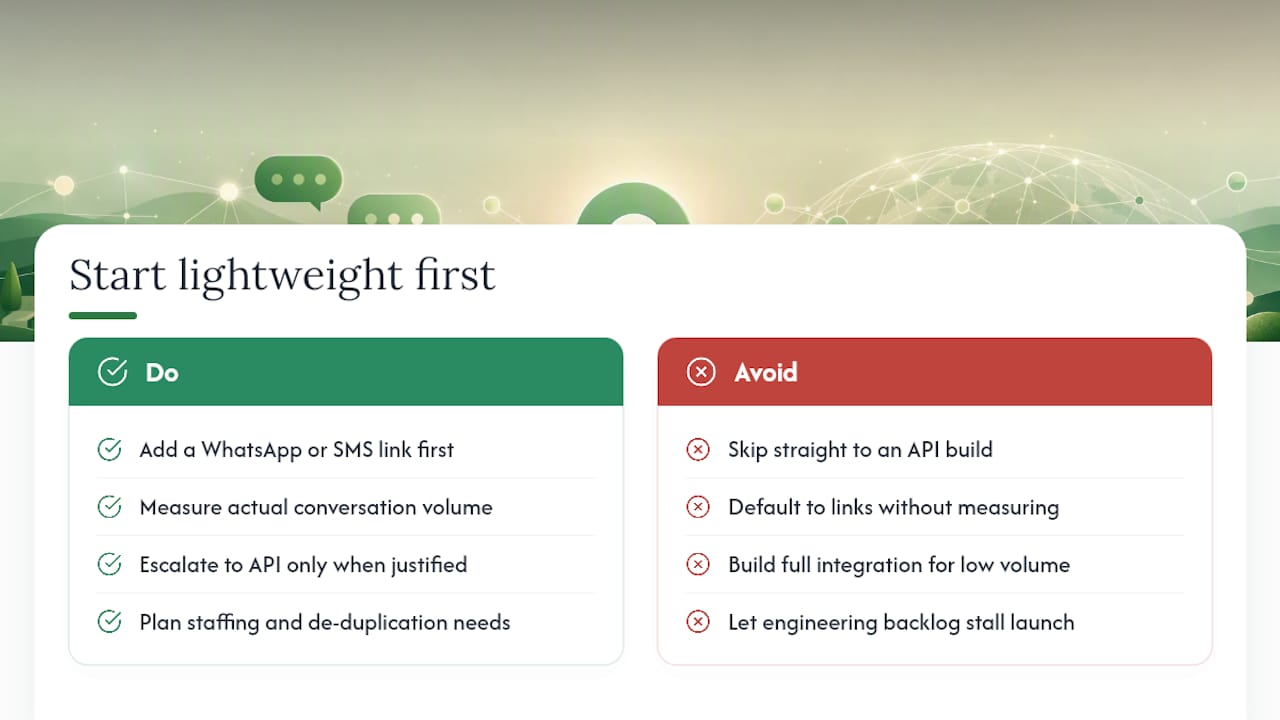
The July 2024 retirement of Business Profile's built-in chat forced a lot of local businesses into a decision they never had to make before. Many defaulted to WhatsApp links without asking whether they'd outgrown that option, and many others are still chasing a full Business Messages build for a volume of inquiries a text link would handle fine.
My take: start with the lightweight path every time. Add the WhatsApp or SMS link, measure how many conversations you're actually getting, and only escalate to a registered agent once volume or complexity justifies the engineering lift, the de-duplication logic, the OAuth flows, the staffing for human handoff. Skipping straight to the API because it looks more sophisticated is how projects stall in a developer backlog while competitors are already answering calls.
— Anas
Getting Help With Google Business Profile and Local Messaging Strategy
Deciding between a WhatsApp link and a full Business Messages build isn't really a technical question first, it's a visibility question. None of it matters if customers aren't finding your Search or Maps listing to begin with. Seohoneybadger is the alternative to guessing your way through Google's messaging options: we handle Google Business Profile setup, verification, and ongoing optimization directly, no outsourcing, no long-term contract, month-to-month pricing you can walk away from anytime.
We'll audit your current Business Profile contact setup, tell you honestly whether a simple WhatsApp link solves your problem or whether a messaging build is worth the investment, and fold that recommendation into a broader plan for ranking higher in local search results. If you run a med spa, dental practice, or home services company wondering what your Business Profile is missing, request an audit and we'll walk you through exactly what's costing you calls.
Sources
- How Business Messages works | Google for Developers
- Changes to Google Business Profile chat and call history - Google Business Profile Help