
GBP categories tell Google what your business IS, and that label drives who see you in the Local Pack. Pick the most specific primary category available. Add 2 to 4 secondary categories that describe services you genuinely provide, then measure the result after 30 days. The primary category carries the most ranking weight of any field on your profile, so if you fix one thing today, fix that.
TL;DR:
- Selecting the most specific primary category directly impacts your visibility and should match your core service closely, based on local competitor patterns.
- Using 2 to 4 secondary categories that reflect genuine services helps avoid dilution of relevance and maintains better ranking stability.
- Regularly auditing categories every three months ensures they stay aligned with your current services and Google's evolving taxonomy.
- Confirm your category choices with API checks and competitor analysis to avoid using outdated or incorrect labels that could harm your ranking.
- Changes to the primary category usually take two to four weeks to impact rankings and may trigger verification, so test one variable at a time and wait 30 days before adjusting again.
Table of Contents
- What Are GBP Categories and Why They Control Your Local Pack Visibility
- How to Choose the Right Primary and Secondary Categories
- How to Find the Categories Your Competitors Are Using
- Where to Get the Complete GBP Category List
- Category Best Practices and the Mistakes That Cost You Visibility
- How Long Category Changes Take to Affect Rankings
- A Practitioner's Audit Checklist for Category Accuracy
- The Playbook That Actually Works, and Where Most Advice Falls Short
- Get Your GBP Categories Audited by the Person Who Actually Does the Work
- Sources
- FAQ
What Are GBP Categories and Why They Control Your Local Pack Visibility
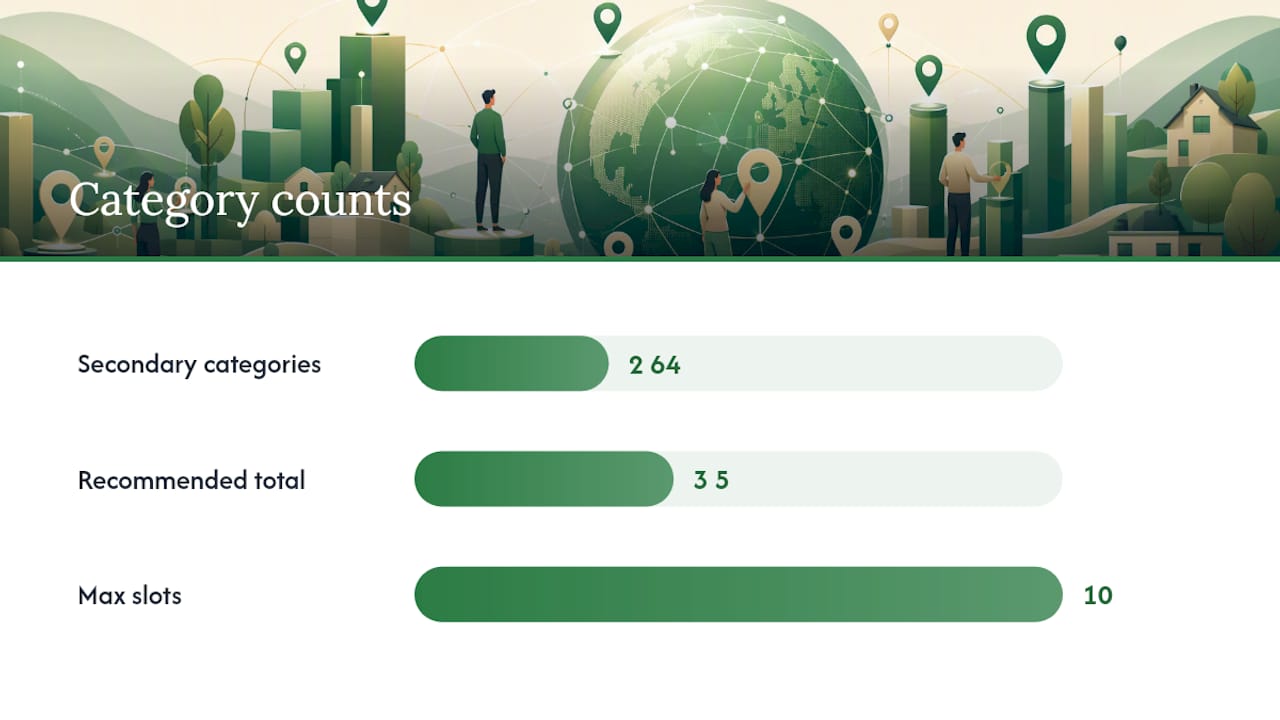
Google Business Profile categories are the tags Google uses to match your listing to search intent. Every profile gets exactly one primary category and can add multiple secondary categories, up to nine, for a maximum of ten total. You cannot invent your own label. If the exact category for your business doesn't exist, Google's own guidance says to pick the closest general match rather than force a custom name into the field.
The taxonomy itself is enormous. Roughly 4,000 categories exist across Google's system as of 2026, and the exact number visible to you shifts depending on your region and the language your profile is set to. A "Pizza Restaurant" category available in the United States might not surface the same way, or at all, in a smaller market with a different language setting. That's why two businesses doing the same work in different countries sometimes end up with different category options staring back at them in the dropdown.
Categories aren't just labels. They're switches. Selecting "Hotel" unlocks booking links and room-rate features that "Lodging" doesn't. Selecting "Dentist" instead of "Medical Clinic" changes which attributes, questions, and even which Google Maps icon show up on your pin. Categories also directly influence which search queries can surface your listing at all. A locksmith who only selects "Hardware Store" as a primary category is telling Google's matching system that hardware sales, not emergency lockouts, is the core business, and that mismatch quietly costs calls.
This is also where the vocabulary gets confusing for new profile owners. "GBP category types" simply means the two tiers, primary and secondary, plus the underlying taxonomy of roughly 4,000 individual category names Google maintains. When people search for a "GBP category list" or "GBP category breakdown," they're really asking for two things: what the full menu of options looks like, and how to pick correctly from it. Both get covered below.
Industry analysis from theStacc's GBP categories guide backs up what practitioners see in the field constantly: the primary category is the single most influential signal in that list, ahead of reviews, ahead of posts, ahead of most on-page work you'd do on a website. Get it wrong and everything downstream works harder to compensate.
How to Choose the Right Primary and Secondary Categories
Start with a blunt question: "This business IS a ___." Not "this business offers," not "this business specializes in." IS. A med spa that primarily does Botox and filler work is not a "Beauty Salon." It's a "Medical Spa," and that three-word difference changes which searches you show up for. Run every service you offer through that filter before touching the dashboard.
Once you have a shortlist of candidate categories, check what's actually working in your market. Open Google Maps, search the exact terms your customers use, and look at the businesses sitting in the top three organic map results. Click into each listing's profile and note which primary category they've selected. This isn't guesswork, it's direct observation of what Google is already rewarding for that query in your city. If all three top-ranked competitors for "emergency water damage repair" are using a specific restoration subcategory rather than the generic "Contractor" label, that's your answer.
Here's the process broken into steps:
- Write your "IS" statement. One sentence describing the core service, no marketing language.
- Search Maps for your top 3 target keywords. Record the primary category of the top 3 stable results for each, ignoring listings that bounce around week to week.
- Match specificity, not just wording. If competitors all use a child category like "Cosmetic Dentist" rather than the parent "Dentist," you likely need the child too.
- Select your primary category based on the closest match to your actual core service and what's winning locally.
- Add 2 to 4 secondary categories, each one a service you actually deliver, not an aspirational one.
- Skip categories five through nine unless you have a genuinely multi-service operation. A HVAC company that also does duct cleaning and water heater installs might legitimately need four or five. A single-service plumber doesn't.
- Document your starting categories before you change anything, so you have a baseline to compare against.
The recommended sweet spot, per industry guidance from theStacc, lands around 3 to 5 total well-chosen categories rather than maxing out all ten slots. More categories does not mean more visibility. It often means diluted relevance, because Google has to guess which of your ten labels actually matters most for a given search.
Three rules keep this process from going sideways. First, specificity beats breadth almost every time. "Italian Restaurant" outperforms "Restaurant" for Italian food searches even though the broader term looks like it should catch more traffic. Second, never select both a parent category and its child category together, like "Restaurant" and "Italian Restaurant" as separate secondary slots. That's redundant, not additive, and it wastes a slot that could describe a different service entirely. Third, only add a category for something you can prove you do. If a reviewer or a Google inspector can't find evidence of a service on your site or in your listing photos, that category becomes a liability, not an asset.
Service-area businesses, meaning companies that travel to customers rather than operating from a storefront customers visit, need to be even more careful here. Without a fixed location acting as a proximity anchor the way a retail storefront has, category precision picks up relative weight in how Google decides to rank the listing. A mobile dog groomer with a vague primary category is fighting an uphill battle that a groomer with a precise one isn't.
Pro Tip: Before you touch your primary category, screenshot your current profile settings and your last 30 days of call and direction-request data in Google Business Profile Insights. That baseline is the only way you'll know if a category change actually helped.
How to Find the Categories Your Competitors Are Using
The fastest way to figure out what category mix wins in your market is to look at who's already winning. Two research paths get you there: direct Maps inspection, and third-party category tools.
Manual inspection is free and takes ten minutes. Search your target keyword phrase on Google Maps exactly as a customer would type it. Click each of the top-ranked listings, tap the business name, and scroll to the category label displayed just under the business name and star rating. That visible tag is the primary category. It won't show you their secondary categories directly, but the primary alone tells you a lot about how Google is bucketing the competition for that query.
For the deeper data, a handful of tools exist specifically for this:
- The PlePer category tool lets you search the full taxonomy by keyword and see related child and parent categories you might not know exist, which matters when the Google dashboard's dropdown search doesn't surface an obscure but relevant option.
- PlePer's GMB categories browser functions as a searchable reference for the complete list of GBP categories, useful when you want to see every variant under a broad heading like "Contractor" before deciding which one fits.
- Sunil Pratap Singh's GBP category browser offers a similar lookup function, handy as a cross-check when you want a second source confirming a category's exact name and availability.
Once you've pulled a handful of competitor primary categories and cross-referenced the full list, look for patterns rather than treating any single competitor as gospel. If four out of five top-ranked plumbers in your area use "Plumber" as primary and none use the more specific "Drain Cleaning Service," that tells you the market rewards the broader term for that particular search, likely because search volume and intent for "plumber" swamps the narrower query. But if you notice a newer, smaller competitor climbing fast with a more specific category no one else uses, that's a signal worth testing rather than ignoring. Sometimes the move is to match the pack. Sometimes it's to differentiate into an underused but accurate niche category nobody else bothered to claim.
Where to Get the Complete GBP Category List
The Google dashboard's category search field only shows you matches as you type, which makes browsing the full taxonomy nearly impossible from inside the interface itself. Three sources solve that problem, each suited to a different kind of user.
Developers and agencies managing multiple listings should go straight to the Google Business Profile API's categories.list endpoint. It returns the complete, localized taxonomy when you supply a regionCode and languageCode parameter, which matters because the categories available in Canada aren't identical to the set available in Australia or Japan. The related categories REST resource also exposes a stable categoryId and displayName for each entry, along with metadata like serviceTypes, which is useful if you're building any kind of automated category audit tool rather than checking listings by hand.
For business owners who don't want to touch an API, third-party browsers like PlePer's full category list give you the same underlying data through a searchable web page. Type a keyword, see every matching category name Google recognizes, including obscure child categories that never surface in casual dashboard searches.
| Source | What it provides | Best for |
|---|---|---|
| Google Business Profile API (categories.list) | Full localized taxonomy, live data, stable category IDs | Developers, agencies managing many listings |
| PlePer category browser | Searchable web interface, no coding required | Individual owners doing manual research |
| Google Help documentation | Rules and constraints on category selection | Understanding what's allowed, not the full list itself |
The Help documentation won't hand you every category name, but it does define the rules those categories operate under, including the restriction against custom categories. Treat the Help page as your rulebook and the API or PlePer as your dictionary.
Category Best Practices and the Mistakes That Cost You Visibility
Run through this checklist every quarter, not just once when you first set up the profile:
- Confirm your primary category is still the most specific accurate match. Google adds and refines categories throughout the year, so a category that didn't exist when you signed up might now be a better fit.
- Audit your secondary categories against services you currently offer, dropping anything you no longer provide.
- Check that your website actually mentions every category you've selected. A profile claiming "Emergency Plumber" with no emergency service page on the linked site is a mismatch a reviewer or algorithm can catch.
- Verify no parent and child category are both sitting in your slots at once.
- Re-run the competitor Maps check described earlier to see if the top three results for your core keywords have shifted their categories.
The mistakes that actually hurt visibility follow a familiar pattern. Piling on irrelevant secondary categories to "cover more searches" is the most common one, and it backfires because Google's matching gets noisier, not broader, when your profile claims ten unrelated services. Selecting both a parent and child category, like "Restaurant" plus "Mexican Restaurant," wastes a slot without adding any new search coverage. Filling all nine secondary slots just because they're available, rather than because each one reflects a real offering, is another version of the same problem. And a category that doesn't match anything on your actual website is a red flag both to human reviewers and to Google's automated systems that cross-check listing claims against site content.
Google does enforce accuracy here, and its own policy is explicit that you must select a category that genuinely describes the business. Profiles with clear category mismatches, especially ones paired with other suspicious signals like address inconsistencies, risk suspension or a demotion in visibility while Google re-reviews the listing.
Pro Tip: Set a recurring calendar reminder every three months to spend fifteen minutes re-checking your categories against the current taxonomy. Categories get added, split, and renamed more often than most owners realize, and a quarterly glance costs almost nothing.
How Long Category Changes Take to Affect Rankings
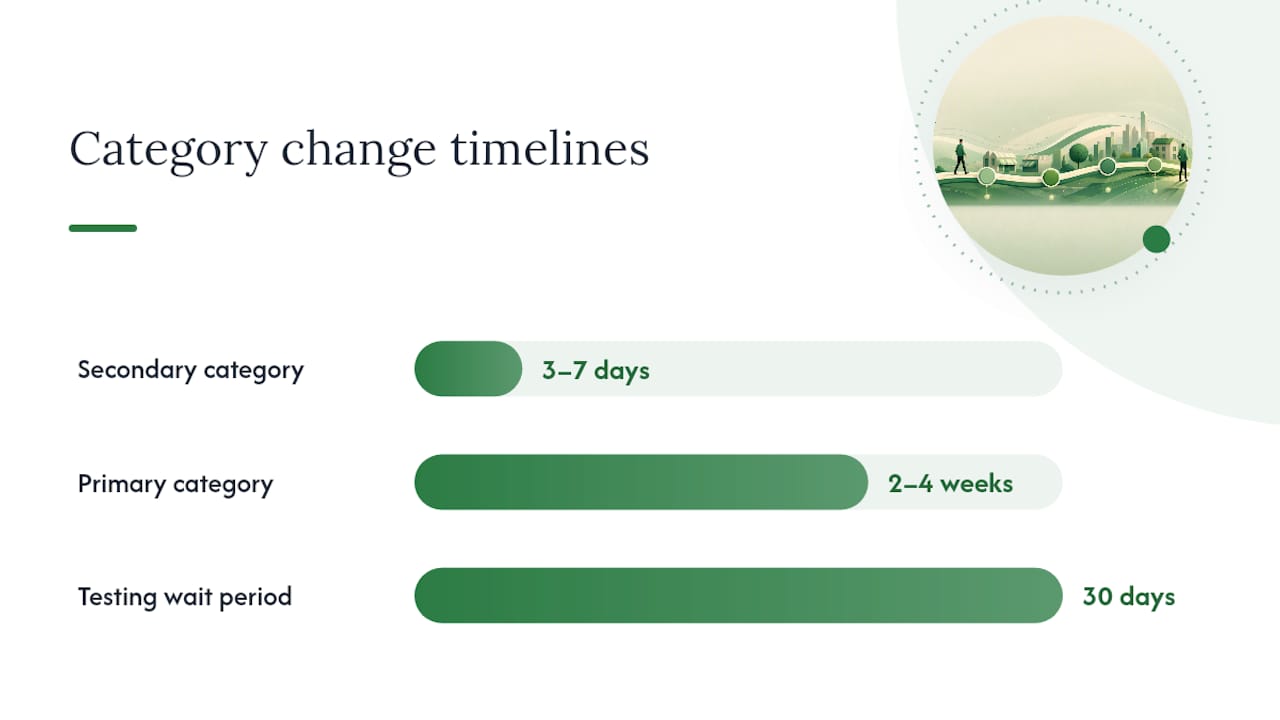
Secondary category changes tend to show measurable movement within 3 to 7 days. Primary category changes take longer, usually 2 to 4 weeks before rankings settle into a new, stable pattern, because Google has to re-evaluate how the listing matches a wider set of queries.
Changing a primary category, in particular, can sometimes trigger a re-verification request from Google, according to reporting from DAC Group on how even minor GBP updates have set off verification workflows. That's not a punishment, it's Google double-checking that a business making a significant self-description change is still who it says it is. You reduce friction here by keeping your website copy, business name, and address consistent with whatever you're claiming in the new category, and by having supporting documentation like a business license or utility bill ready if a verification request lands.
A sound testing protocol looks like this:
- Change one category at a time, never your primary and three secondaries in the same session.
- Track ranking position and call/direction-request volume through geo-grid tracking or Business Profile Insights before and after the change.
- Wait at least 30 days between major changes before drawing conclusions or making the next move.
- Revert immediately if you see a sustained drop rather than normal week-to-week noise.
That 30-day window matters more than it sounds. Change two variables in the same week and you'll never know which one moved the needle, up or down.
A Practitioner's Audit Checklist for Category Accuracy
A category audit doesn't need to be complicated, but it does need to be done in the right order. Here's the seven-step version used when auditing a client profile from scratch:
- Verify the current primary category against the "This business IS a ___" test, not against what it was five years ago when the listing was first created.
- Validate every secondary category by confirming a matching service exists on the live website, not just in the owner's head.
- Check site alignment, meaning does the primary category's core service have its own dedicated page rather than a single buried sentence.
- Review match quality by searching the top target keywords on Maps and comparing primary categories against the top three stable competitors.
- Run an API check using categories.list to confirm the exact category name and ID still exist and haven't been renamed or split into subcategories.
- Document competitor category patterns across at least five ranking competitors, not just one or two.
- Set up tracking before making any change, whether that's geo-grid software or a simple weekly Insights export.
The single biggest category error we see when auditing a new client profile isn't a bad primary category. It's an owner who selected the right primary category two years ago, then never revisited it as their service mix changed and Google's taxonomy expanded around them.
Testing works the same way whether you manage one listing or fifty: change a single variable, measure call volume and rank position for 30 days, then decide based on the data rather than a hunch. Success looks like a stable or improved rank position paired with steady or increased call/direction-request volume. Failure looks like a rank drop that holds for more than two weeks straight. The Honey Badger SEO GBP optimization service runs this exact audit-and-test cycle for client profiles, with documented outcomes in the case studies section.
The Playbook That Actually Works, and Where Most Advice Falls Short
Most GBP category advice stops at "pick the most specific category," which is true but incomplete. The gap is testing. Plenty of guides tell you what the primary category should theoretically be. Very few tell you to change one variable, wait 30 days, and measure against a documented baseline before calling it a win.
The conventional wisdom also oversells the secondary category slots. Nine available slots does not mean nine is the target. The businesses that struggle with category confusion aren't usually the ones with too few categories, they're the ones who filled every slot trying to catch every possible search and ended up diluting the one signal, the primary category, that actually carries the ranking weight.
If there's one thing to prioritize first, it's the API check, not because most owners need to write code, but because knowing that a category's exact name and ID still exist in Google's current taxonomy beats guessing from a dashboard dropdown that hides half the available options. Pair the canonical Google documentation with a disciplined, one-variable-at-a-time testing habit, and category optimization stops being guesswork and starts being a measurable lever.
— Anas
Get Your GBP Categories Audited by the Person Who Actually Does the Work
This service offers an alternative to traditional agencies for GBP category audits, with direct management of API checks, competitor research, and 30-day tests on listings.
An engagement starts with a full audit of your current primary and secondary categories against the live taxonomy, a competitor scan of the top-ranked listings in your market, and a documented baseline before anything changes. From there, category adjustments get tested one at a time using the same 30-day measurement window covered above, with reporting that shows call and direction-request changes, not vanity metrics. The Google Business Profile Optimization service runs month-to-month, so there's no long-term lock-in if the results don't hold up. Businesses in home services, dental, and med spa categories have seen this exact process documented in the case studies archive. If your profile hasn't had its categories reviewed in the past year, request a category audit through the GBP services page and get a documented starting point before you change anything yourself.
Sources
The primary sources behind this playbook are worth keeping open in a browser tab whenever you're actively managing categories:
- Manage your business category
- Method: categories.list | Google Business Profile APIs | Google for Developers
- Google Business Profile Categories - Full List ( 2026 )
- GBP categories guide (theStacc)
- Small Google Business Profile updates sometimes trigger re-verification
A local IT partner resource like CTA Systems can also be worth consulting if verification issues intersect with broader technical or network problems affecting how your business information gets confirmed online.
FAQ
What Are GBP Categories?
GBP categories are the labels Google Business Profile uses to define what a business does, consisting of one required primary category and up to nine optional secondary categories. Google maintains the full list, roughly 4,000 categories as of 2026, and businesses select from that existing set rather than creating their own.
What Are the Categories Available for Google Business Profile in 2026?
The available categories depend on your business's region and the language setting on your profile, since Google's taxonomy is localized rather than identical worldwide. The full current list can be pulled through the categories.list API or browsed through a tool like PlePer's category search.
What Is Your Product Category on Google Business Profile?
Your "product category" on a Google Business Profile is really your selected business category, which describes the core service or product line rather than an individual item for sale. Retailers and product-based businesses should still follow the "This business IS a ___" test to pick the most specific match available, such as "Furniture Store" rather than the broader "Retail Store."
What Are Google Categories, Generally?
"Google categories" usually refers to the Business Profile category system that determines how a listing appears in Maps and the Local Pack, distinct from Google's other classification systems like content or ad categories. For local business purposes, it always comes back to the primary and secondary category fields inside the Business Profile dashboard.
How Many Secondary Categories Should I Use?
Most businesses see the best results with 2 to 4 secondary categories rather than filling all nine available slots, according to industry guidance recommending 3 to 5 total categories including the primary. Adding categories for services you don't genuinely offer dilutes relevance rather than expanding reach.
Does Changing My Primary Category Hurt My Rankings?
Changing a primary category can cause temporary ranking fluctuations for 2 to 4 weeks while Google re-evaluates the listing, and it can occasionally trigger a re-verification request. Testing one category change at a time and waiting at least 30 days before making another change limits the risk and makes results easier to interpret.