
Dynamic number insertion (DNI) automatically swaps the phone number on your website so every call ties back to the campaign or keyword that brought the visitor. Marketers running multi-channel campaigns and local businesses that live on phone leads benefit most, since it turns an anonymous ring into a line item in your reporting.
TL;DR:
- Session-based DNI offers the most detailed attribution but requires a large pool of numbers to accommodate simultaneous visitors, making it best for PPC-heavy campaigns.
- Source-based DNI simplifies management by assigning one number per channel or campaign, providing insight only at the channel level but reducing costs.
- Setting up DNI involves installing tracking scripts, defining swap targets, and testing with real campaign data to ensure accurate call attribution.
- The appropriate number pool size depends on peak concurrent visitors, with advice to start conservatively and expand as needed to avoid under- or over-provisioning.
- Proper integration with Google Ads, GA4, and CRM systems ensures call data is actionable, while careful attention to data accuracy and privacy safeguards maintains local SEO and legal compliance.
Table of Contents
- How Dynamic Number Insertion Works, Step by Step
- Session-Based vs. Source-Based vs. Keyword-Level DNI
- Setting Up DNI: A Practical Installation Checklist
- How Many Tracking Numbers Do You Actually Need?
- Connecting DNI to Google Ads, GA4, and Your CRM
- Fixing the Most Common DNI Problems
- Does DNI Hurt Local SEO or NAP Consistency?
- Keeping Your DNI Data Clean and Accurate
- Call Routing and the Customer Experience Side of DNI
- Staying Compliant While Running DNI
- Honey Badger SEO's Take on Making DNI Actually Work
- Get Help Setting Up Call Tracking That Actually Attributes Correctly
- Where to Go Deeper on DNI Implementation
- Sources
- FAQ
How Dynamic Number Insertion Works, Step by Step
DNI runs on a simple loop: detect where the visitor came from, hand them a matching number, swap it into the page, and keep that assignment alive long enough to log the call correctly. A JavaScript snippet requests a number from a pool and replaces the number visible on the page, so what the visitor sees is never your one true business line but a temporary stand in tied to their session.
Here's the actual sequence:
- Source detection. The script reads UTM parameters, the HTTP referrer, and, for paid search, the Google Ads click ID (gclid) attached to the landing URL.
- Number request. That source data gets sent to the call tracking platform, which checks its pool for an available number matching the source or campaign.
- Swap. The script finds the phone number element on the page (by CSS class, text pattern, or data attribute) and replaces it with the tracking number, all before the visitor notices anything changed.
- Session persistence. The same number follows the visitor across pages during their visit, usually for a set window (commonly 30 to 90 minutes), so a click on the homepage and a call from the contact page still credit the same source.
- Release and logging. Once the session expires or the visitor leaves, the number returns to the pool for reuse, while the backend logs the original UTM, referrer, and gclid data against that call record.
The forwarding step is invisible to the caller. They dial the tracking number, the system checks who it belongs to at that moment, and routes the call straight to your real business line while attaching session metadata to the call log. That metadata is the entire point. Without it, you have a call. With it, you have a call from a specific keyword, ad, or landing page.
Session-Based vs. Source-Based vs. Keyword-Level DNI
Not every business needs the same level of granularity, and picking the wrong tier either wastes money or leaves you blind to what's actually working.
- Session-based DNI assigns a unique number to each individual visitor session, which gives you the most granular attribution but demands the largest number pool since every concurrent visitor needs their own line. This is the right fit for PPC-heavy advertisers who need to know exactly which ad and landing page drove a call.
- Source-based DNI assigns one number per channel or campaign (one for Google Ads, one for organic, one for a print flyer) instead of per visitor. It's cheaper to run and easier to manage, though you only get channel-level insight, not keyword-level.
- Keyword-level DNI layers gclid capture on top of session-based tracking so calls map back to the exact search term that triggered the ad.
A solo dentist running one Google Ads campaign and some organic traffic rarely needs session-based tracking. A local dentist gets more value from source-based numbers split between "Google Ads," "Google Business Profile," and "organic search." A small agency managing several client accounts, or a high-volume ecommerce brand running dozens of ad groups, usually needs keyword-level attribution to justify per-keyword bid changes.
Setting Up DNI: A Practical Installation Checklist
Getting DNI running correctly is mostly a matter of following the sequence in order and testing before you trust the data.
- Install the tracking script. Most platforms give you a snippet to drop in the site header or footer, or a container tag you can deploy through Google Tag Manager instead of editing template files directly.
- Check for a WordPress plugin path. If your site runs on WordPress, many call tracking vendors offer a plugin that handles script placement and swap-target detection without touching theme code.
- Define your swap targets. The script needs to know which elements on the page contain the phone number. CSS classes and data attributes are more reliable than pattern matching alone, especially on sites with inconsistent phone number formatting.
- Fix any number rendered as an image. A phone number baked into a logo graphic or a scanned business card image can't be swapped by JavaScript. Replace it with live text, or build a custom hook if the design has to stay.
- Configure your number pool and destination. Set how many tracking numbers you want available, which real number they forward to, and whether forwarding rings simultaneously or in sequence.
- Test with known links. Load your site using a URL with a real UTM string and a real gclid, confirm the number swaps, then place a test call and check that the source data shows up correctly in your dashboard.
- Verify cross-subdomain behavior. If your site or checkout flow spans subdomains, confirm the session persists across that jump instead of resetting and losing attribution.
Pro Tip: Run your test call from a phone that isn't already saved in your CRM. Cached contact records can mask a swap that isn't actually working, and you won't catch the error until real leads start showing up misattributed.
How Many Tracking Numbers Do You Actually Need?
Pool sizing comes down to one question: how many visitors who might call are on your site at the same time? Estimate peak concurrent visitors, multiply by how long a typical session stays active, and add a buffer for traffic spikes.
- Low-traffic local sites (a single-location service business) typically need a small starting pool, often in a small to moderate number range of tracking numbers.
- Mid-traffic sites running multiple ad campaigns need a proportionally larger pool to avoid two unrelated visitors sharing the same number at once.
- High-traffic or ecommerce sites with heavy concurrent visitor counts need the largest pools and should size for their busiest hour, not their daily average.
- Watch utilization, not just raw traffic. Keeping utilization under roughly 80% gives you headroom during unexpected spikes without paying for numbers that sit idle most of the month.
Start conservative. It's cheaper to add numbers when your dashboard shows you're bumping against capacity than to pay for a pool sized for traffic you don't have yet.
Connecting DNI to Google Ads, GA4, and Your CRM
DNI only pays off when the call data actually reaches the tools you use to make decisions.
- Enable auto-tagging in Google Ads so every ad click carries a gclid parameter. Without it, your DNI script has nothing to match calls back to specific keywords, and analytics-driven attribution breaks down before it starts.
- Send call events into GA4 as conversions, tagged with the same campaign and source data captured at the swap. This puts phone leads in the same reports as your form fills and purchases.
- Sync call metadata into your CRM. UTM source, landing page, and caller ID should land on the lead record automatically, so sales reps see the full context before they pick up the phone.
- Set consent and recording rules deliberately. If you record calls for quality or attribution purposes, confirm your platform's consent settings match what your jurisdiction requires before you turn recording on.
For campaigns run through a paid search partner, this is also where coordination matters most. Confirm with whoever manages your Google Ads account that auto-tagging stays on and that landing page redirects preserve the gclid string, since a stripped parameter breaks keyword attribution even when everything else works.
Fixing the Most Common DNI Problems
Most DNI failures trace back to one of a handful of predictable causes.
- No swap happening at all. Confirm the script is loading on every page, not just the homepage, and check that your swap-target selector actually matches the HTML around your phone number.
- Numbers baked into images. A number in a logo, banner, or scanned graphic can't be detected by a JavaScript swap and needs to be converted to live text.
- Wrong or inconsistent attribution. Check that your phone number format matches what the platform expects (standard formats like 111-222-3333 work most reliably) and that gclid parameters survive any redirects between the ad click and the landing page.
- Pool exhaustion during traffic spikes. If utilization creeps toward capacity, increase pool size before, not after, a seasonal or promotional traffic surge.
Pro Tip: Keep a spreadsheet of every known good test link (UTM and gclid combinations) you've used to verify tracking. When something breaks, you can rerun the exact same links instead of trying to reconstruct what "should" work from memory.
Does DNI Hurt Local SEO or NAP Consistency?
DNI is safe for local SEO when set up correctly, but it requires one deliberate safeguard: your structured data should always list your default, permanent business number, not a rotating tracking number. Search crawlers typically render the default number that loads before JavaScript executes the swap, and that's the number that belongs in your schema.org LocalBusiness markup to keep your name, address, and phone number consistent across the web.
On the privacy side, treat call and session data the way you'd treat any customer record. Store caller ID and session logs securely, limit who can access raw call recordings, and redact personal details from shared reports where you can. Rules around call recording consent and telemarketing vary by state and country, so check local requirements, or a qualified attorney, before recording calls at scale.
Keeping Your DNI Data Clean and Accurate
Bad attribution data is worse than no attribution data, because it looks trustworthy while quietly steering budget in the wrong direction. A few habits keep DNI numbers honest.
Audit your swap targets whenever you redesign a page or change a template. A CSS class rename during a site refresh is one of the most common silent killers of DNI tracking, since the script keeps running but simply stops finding anything to swap.
Reconcile call counts monthly against your actual phone bill or call log from your carrier. If the numbers drift apart, something in the pipeline, usually a missed swap or a session persistence issue, is dropping calls before they get attributed.
Standardize how UTM parameters get built across every campaign, whether that's paid search, email, or a print QR code. Inconsistent naming (utm_source=google versus utm_source=Google) fragments your reporting even when the underlying tracking works fine.
Finally, review your number pool's call logs for anything routed to the wrong destination. Misconfigured forwarding rules are rare but expensive, since a single wrong destination number can send real customer calls to the wrong location or department for weeks before anyone notices.
Call Routing and the Customer Experience Side of DNI
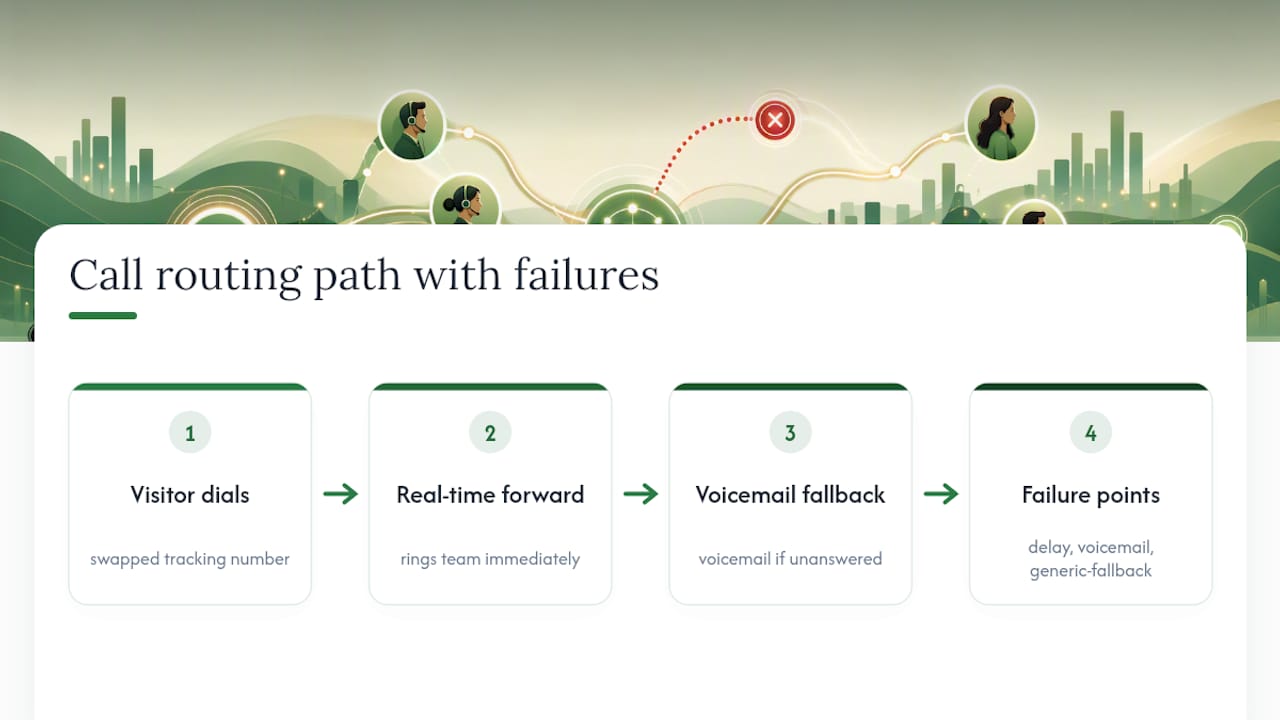
Done well, DNI is invisible to the caller. They see a number, they dial it, and the call reaches your business exactly like it always did. The forwarding happens in real time, and the only thing that changes is what your reporting captures on the back end.
Done poorly, it creates friction. Overly aggressive session windows can cause a returning visitor to get a different number than the one they saved from a previous visit, which occasionally triggers confusion or a "wrong number" hangup. Pool exhaustion can force a fallback to a generic number that loses attribution entirely, and forwarding misconfigurations can add ring delay or send calls to voicemail during business hours.
The fix for most of this is routing logic, not tracking logic. Set forwarding to ring your team immediately, define a sensible voicemail fallback, and make sure whoever answers the tracking line identifies your business the same way regardless of which number rang. Customers should never be able to tell they dialed a tracking number rather than your main line.
Staying Compliant While Running DNI
DNI itself doesn't carry special legal exposure beyond what already applies to any phone system that records or forwards calls. The compliance work is about the data you collect around each call, not the number swap mechanism.
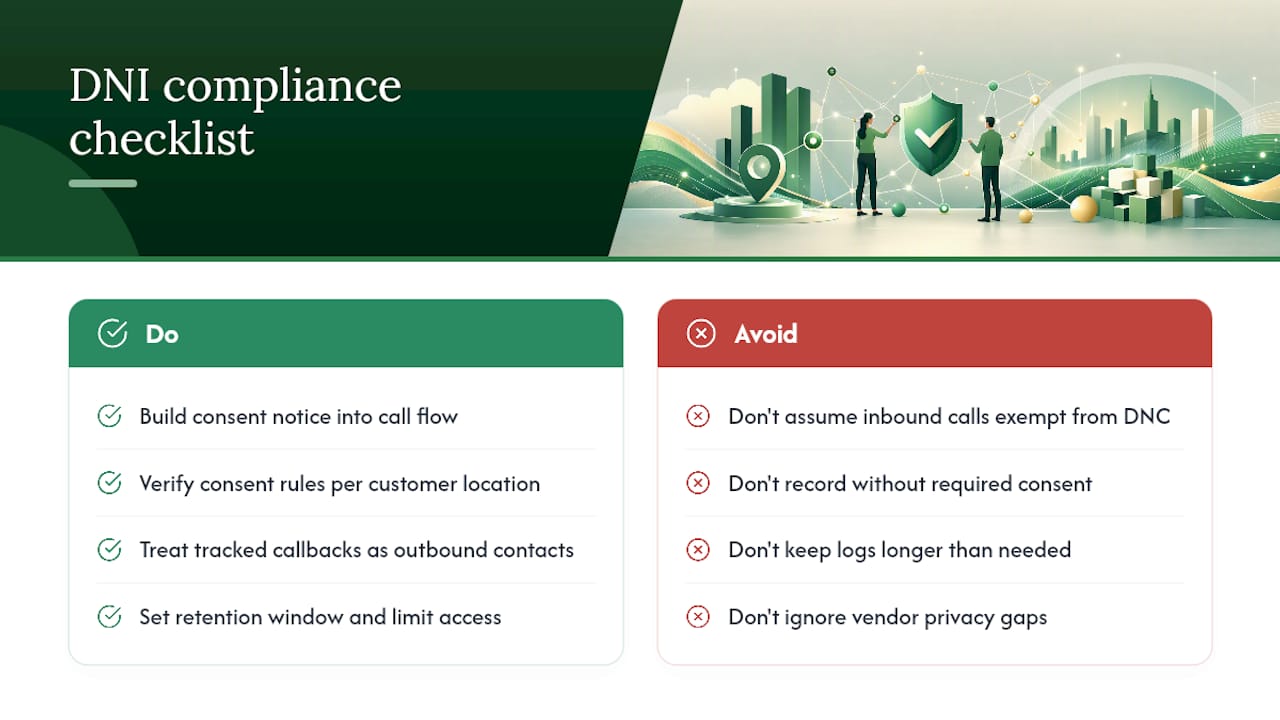
Call recording consent laws vary significantly by state and country, and some jurisdictions require two-party consent before you can record a conversation at all. If your call tracking platform records calls for quality assurance or attribution verification, build a consent notice into the call flow and confirm it satisfies the rules where your customers are located.
Telemarketing and do-not-call regulations generally apply to outbound calls your business makes, not inbound calls a customer initiates to a tracking number, but the line can blur if you use tracked numbers for callback campaigns. Treat any outbound follow-up triggered by a tracked call with the same care you'd apply to any other outbound contact.
Data retention matters too. Session logs, caller ID records, and call recordings all count as personal data under most privacy frameworks. Set a retention window, limit internal access, and confirm your call tracking vendor's data handling terms match your own privacy policy commitments. When in doubt on a specific rule in your jurisdiction, a quick consult with legal counsel costs far less than a compliance mistake.
Honey Badger SEO's Take on Making DNI Actually Work
Seohoneybadger pairs DNI with Google Business Profile and local SEO work because a tracked number is only useful if the traffic behind it is worth tracking. The Arizona Dental Group case study shows what that combination looks like with real numbers attached. Before expanding a number pool, audit what you're already tracking. Most sites waste capacity on channels that were never generating calls in the first place.
— Anas
Get Help Setting Up Call Tracking That Actually Attributes Correctly
Get tracked calls tied to the exact campaign that earned them, with direct management of the technical work rather than outsourcing. The service includes a call tracking audit, hands-on DNI implementation, ongoing monitoring of the number pool, and alignment with your Google Business Profile so tracked numbers and NAP data stay consistent across search results.
Every engagement runs month-to-month, so you see whether the tracking setup is actually producing attributable calls before committing to anything longer. If your business relies on the phone ringing, whether that's a dental practice, a med spa, or an insulation contractor buried in estimate requests, start with a look at how Scottsdale SEO clients get calls attributed correctly from the first campaign. Reach out for an audit of your current setup before you add a single new tracking number.
Where to Go Deeper on DNI Implementation
For account-specific setup steps, the vendor documentation stays more current than any third-party guide. Start with Twilio's DNI glossary for the technical mechanics, and CallRail's help center for swap-target configuration and troubleshooting specific to that platform.
Sources
- What is Dynamic Number Insertion (DNI)?
- Dynamic number insertion overview – CallRail Help Center
- What is Dynamic Number Insertion, How it Works, and How It Can Help You Accurately Track Phone Calls
FAQ
What Does "Dynamic Number" Mean?
A dynamic number is a phone number that changes based on how a visitor found your website, letting you tie the resulting call back to a specific campaign, ad, or keyword instead of treating every call the same.
What Is Dynamic Number Insertion in Call Tracking Platforms Like CallRail?
In platforms like CallRail, DNI is the JavaScript-based swap that detects a visitor's source and replaces the visible phone number with one from a tracking pool, logging the source data against the resulting call.
Why Do I Keep Seeing a Different Phone Number on the Same Website?
You're likely seeing a tracking number assigned through DNI based on how you arrived at the site (a search ad, an organic result, or a referral link), and it's routed to forward straight to the business's real line.
What's the Difference Between a Static and a Dynamic Number?
A static number stays the same for every visitor and every channel, while a dynamic number changes depending on the traffic source, which is what makes campaign-level and keyword-level attribution possible in the first place.